



The Complete Excel Course with AI Integration
Excel course for small business owners
For small business owners and freelancers who run the numbers of their business in Excel, often on their own. The Complete Excel Course with AI Integration starts from the first cell, and this page picks out what a small business uses: a cash book of income and costs, SUMIFS for profit by month, invoices with days overdue, the FinanceGuard budget against actual, PivotTables for sales by product and customer, WealthFlow for savings and retirement, and AI for a summary you then check.
Taught by Sagnik Bhattacharya and Virginia Thorn

What you will be able to do
At work, you will be able to:
- Record sales and expenses in one workbook and see profit by month and category with SUMIFS.
- Keep a list of customer invoices with the days overdue counted from TODAY, unpaid ones in colour and the total still owed from SUMIFS.
- Compare what you spend with your budget each month: variance and percent variance, colour for an overspend and a dashboard with KPI cards.
- See which products and customers bring in the most with a PivotTable, a slicer and a chart.
- Plan savings or a pension with FV: a monthly investment calculator first, then a retirement plan with yearly step-ups and inflation.
- Ask Copilot, ChatGPT or Claude for a summary of the month, and check the figures against a short checklist before you act on them.
Projects
What you will build.
The course has 14 projects. These five matter most here.
-
Project 01
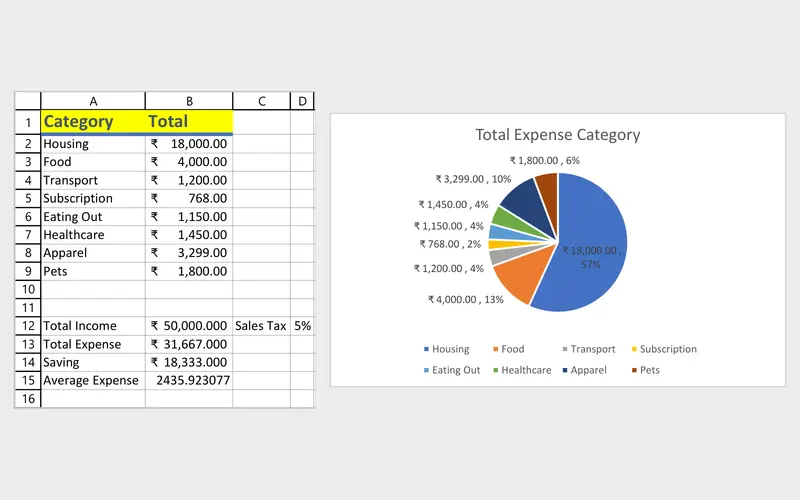
Personal Budget Tracker
Your first workbook: where the money goes each month.
A business cash book started the simple way: income and costs in columns, totals and averages, colour warnings and a summary by category for each month.
-
Project 05
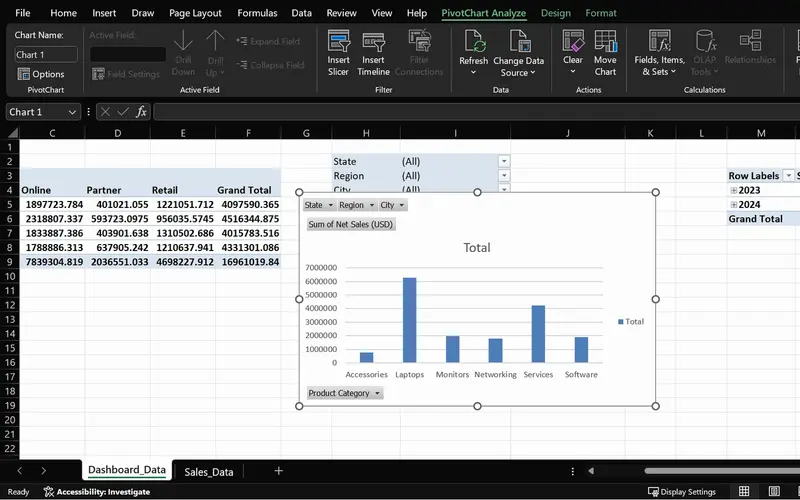
SalesPlusPerformance
A sales question answered in seconds, straight from the order data.
Which products and customers bring in the most, from your own order list, with a slicer to look at one month at a time.
-
Project 09
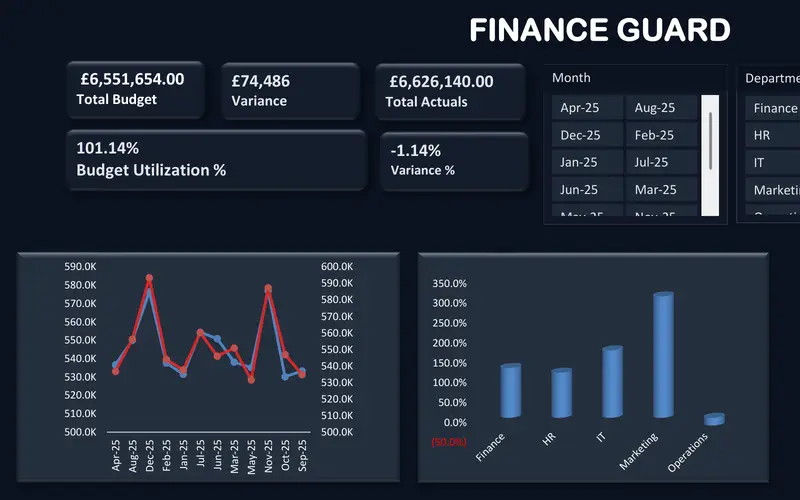
FinanceGuard
The budget vs actual report finance teams send every month.
Your budget set against what you actually spent, line by line, with an overspend shown in colour while there is still time to act.
-
Project 10
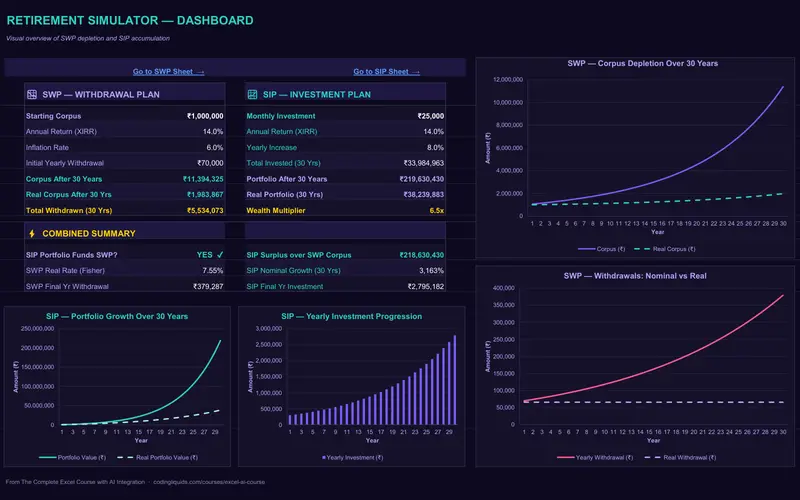
WealthFlow
A retirement plan that shows how long the money lasts.
A pension for someone with no employer scheme: monthly saving with yearly step-ups, withdrawals later on, and inflation built into the figures.
-
Project 03
Sales Goal Tracker
SUMIFS for profit by month and category, COUNTIFS for orders by customer, and IF to mark an invoice that has gone past its due date.
Lessons
The lessons that matter, in course order.
The Complete Excel Course with AI Integration has 186 lessons. This page picks out 67 of them, 5 h 46 min of video. Each lesson keeps its number in the course.
Where to start
Lesson 1 Introduction
Begin at Lesson 1 if Excel is new to you: the course starts with the window and your first spreadsheet. If you already write simple formulas, go to Lesson 28. If SUMIFS and PivotTables are familiar, go straight to Lesson 115, where the budget against actual project begins.
67 of 186 lessons · 5 h 46 min
01 Microsoft Excel fundamentals: building a foundation from scratch Excel from the first cell: the window, workbooks and sheets, number and date formats, sums and AutoSum, absolute references, percentages, common errors and how to lay a workbook out. The lessons build a personal budget; a business's income and costs sit in the same kind of columns.
- 1 Start here Introduction Free preview 2 min
- 2 Course overview What you will learn in this Excel and AI course Free preview 5 min
- 3 The Excel interface Ribbon, tabs, name box, formula bar and navigation Free preview 13 min
- 4 Workbooks and worksheets in Excel Add, rename, move and navigate sheets Free preview 6 min
- 5 Your first Excel spreadsheet Cells, rows, columns and data types in a budget 8 min
- 6 Number formatting in Excel Currency, date and percentage formats for a budget 5 min
- 7 Cell formatting in Excel AutoFit column width, the #### error and cell styles 6 min
- 8 Basic maths in Excel Add, subtract, multiply and divide with formulas 3 min
- 9 SUM and AutoSum in Excel Total income, expenses and savings with MAX 6 min
- 10 Relative vs absolute references in Excel Dollar signs and mixed references 3 min
- 11 Calculating percentages in Excel Each expense as a percentage of income 2 min
- 12 Common Excel errors and how to fix them DIV0, NAME, VALUE errors and IFERROR 4 min
- 13 Organising an Excel workbook Dashboard, transactions and notes sheets 2 min
02 Project: personal budget tracker The Personal Budget Tracker: totals and averages, conditional formatting warnings, a monthly summary by category, a pie chart of spending and a calculator that shows how a monthly investment grows.
- 14 SUM and AVERAGE in Excel Personal budget tracker totals and average expense 4 min
- 15 Conditional formatting in Excel Highlight rules, data bars and icon sets 3 min
- 16 Monthly expense summary in Excel Category totals for a personal budget tracker 7 min
- 17 Excel charts for beginners Pie chart of budget expenses by category 8 min
- 18 SIP growth calculator in Excel FV function for mutual fund investment growth 7 min
04 Essential formulas and functions (IF, SUMIF and more) The formulas a small business sheet runs on: IF to mark an invoice overdue or an item to reorder, AND and OR for two conditions, SUMIF and SUMIFS for profit by month and category, COUNTIFS for orders by customer, and TODAY with date arithmetic for days outstanding. The lessons use sales figures.
- 28 Logical functions in Excel TRUE and FALSE comparisons for beginners 5 min
- 29 The IF function in Excel Pass or fail results with a single condition 3 min
- 30 IF function practice in Excel Categorise sales data with IF formulas 6 min
- 31 Nested IF and IFS in Excel Customer value tiers with nested IF 6 min
- 32 Nested IF and IFS in Excel Sales performance labels with the IFS function 5 min
- 33 AND and OR with IF in Excel Flag high-value deals with multiple conditions 8 min
- 34 SUM, COUNT and COUNTA in Excel SUM with FILTER and counting numbers with COUNT 7 min
- 35 SUM, COUNT and COUNTA in Excel COUNTA, unique counts and completeness checks 4 min
- 36 SUMIF and COUNTIF in Excel Conditional sum and count with one criterion 8 min
- 37 SUMIFS and COUNTIFS in Excel Sum and count with multiple criteria 7 min
- 38 The Excel function library Insert Function dialog and Formula AutoComplete 5 min
- 39 Date and time functions in Excel TODAY, NOW, MONTH and date arithmetic 6 min
- 40 Excel Ninja Challenge COUNTIF, SUMIF, IF, COUNTIFS, SUMIFS and IFS practice 8 min
07 PivotTables and PivotCharts: data analysis made easy PivotTables for your own order list: sales by product, customer and month, grouping by date, slicers, PivotCharts and a refresh when new orders are added.
- 57 PivotTables 101 in Excel What a PivotTable does and the sales dataset 5 min
- 58 Preparing data for PivotTables Clean data with TRIM, PROPER, find and replace 5 min
- 59 Create your first PivotTable in Excel Insert a PivotTable from a sales table 1 min
- 60 PivotTable fields in Excel Rows, values, columns and Value Field Settings 2 min
- 61 PivotTable summaries in Excel Sales by product category and grouping by date 4 min
- 62 Slicers in Excel Filter PivotTables with clickable buttons 3 min
- 63 PivotCharts in Excel Create interactive charts from a PivotTable 5 min
- 64 PivotTable design Tab Report layouts, PivotTable styles and number formats 5 min
- 65 Refresh a PivotTable in Excel Update pivots when source data changes 2 min
- 66 Excel Ninja Challenge PivotTable sales by region, category and monthly trend 1 min
10 Boosting productivity with AI in Excel (Copilot, ChatGPT and Claude) AI without the hype: what Copilot, ChatGPT and Claude can and cannot do, a table prepared for Copilot, a summary of a data set in seconds and how to write a clear prompt.
- 88 AI in Excel What Copilot, ChatGPT and Claude can and cannot do 8 min
- 89 Prepare data for Copilot in Excel Tables, headers and clean structure 6 min
- 90 Copilot executive summary in Excel Summarise a dataset in seconds with AI 5 min
- 91 Copilot prompts for Excel Weak vs strong prompts and the PRO prompt pattern 5 min
10 Boosting productivity with AI in Excel (Copilot, ChatGPT and Claude) A quick checklist for AI output: what to verify before a figure from Copilot goes into your accounts or a message to a client.
- 99 Check AI output in Excel A quick QA checklist for Copilot results 2 min
12 Project: FinanceGuard budget variance analyser (budget vs actual Excel dashboard) FinanceGuard: budget and actual tables, a model built with SUMIFS and dynamic arrays, variance and percent variance, colour-coded number formats and a dashboard with KPI cards, a combo chart and slicers.
- 115 FinanceGuard budget vs actual dashboard Excel project overview 3 min
- 116 Excel tables for budget and actual data Organise the FinanceGuard datasets 4 min
- 117 Budget vs actual model in Excel SORT, UNIQUE, VSTACK, LET, TEXTSPLIT, SUMIFS 8 min
- 118 Budget variance in Excel Calculate variance and percent variance 4 min
- 119 Custom number formats in Excel Show budget variances with colours and signs 2 min
- 120 PivotTables for budget vs actual The FinanceGuard pivot workspace 8 min
- 121 KPI cards in Excel Summary cards for a budget variance dashboard 4 min
- 122 Budget vs actual charts in Excel Combo chart with secondary axis for variance 5 min
- 123 Slicers and PivotCharts in Excel Interactive FinanceGuard budget dashboard 4 min
- 124 Finish the FinanceGuard dashboard in Excel Final polish and variance insights 10 min
13 WealthFlow investment and retirement simulator WealthFlow: monthly investing with yearly step-ups, withdrawals in retirement and the effect of inflation, modelled with FV, XIRR and IF and tested against tougher scenarios, then a retirement simulator dashboard built with Claude's help.
- 125 SIP and SWP calculators What is an SIP, lump sum and compounding 6 min
- 126 SIP and SWP calculators What is an SWP, inflation and FIRE 6 min
- 127 WealthFlow SIP model in Excel Input assumptions, XIRR and monthly rate 6 min
- 128 WealthFlow SIP model in Excel Step-up SIP table and FV formulas 6 min
- 129 WealthFlow SIP model in Excel Real portfolio value, inflation and charts 7 min
- 130 WealthFlow SWP model in Excel Real rate, corpus and yearly withdrawals 6 min
- 131 WealthFlow SWP model in Excel Real corpus, stress test and SWP chart 5 min
- 132 Retirement simulator in Excel WealthFlow inputs, year and age columns 5 min
- 133 Retirement simulator in Excel SIP, withdrawal and portfolio formulas with IF 7 min
- 134 Retirement simulator in Excel Reading the results and retirement scenarios 5 min
- 135 Retirement simulator in Excel Claude builds the WealthFlow dashboard 5 min
Instructors
Who teaches it.

Instructor, Excel with AI
Virginia Thorn
Emmy Award winner. Teaches Excel with AI at Coding Liquids.
Questions
Asked before starting.
Is there an Excel course for small business owners and freelancers?
Yes. Most of what a small business keeps in Excel can be built with what The Complete Excel Course with AI Integration from Coding Liquids teaches: a cash book of income and costs, profit by month with SUMIFS, invoices and days overdue, budget against actual in the FinanceGuard project, sales by product in a PivotTable and WealthFlow for savings and retirement. It starts from the first cell. The 67 lessons on this page take 5 hours 46 minutes.
Do I need to know accounting to follow it?
No, and The Complete Excel Course with AI Integration does not teach accounting either. It teaches Excel: how to record income and costs, total them by month and category, compare them with a budget and chart them. Your accountant's rules decide what goes in which column; the course shows how to make the workbook add it up.
Can I keep track of who owes me money in Excel?
Yes, with formulas The Complete Excel Course with AI Integration teaches, though it has no invoice template. List each invoice with its due date, let TODAY count the days overdue, have IF mark the late ones and conditional formatting colour them, and use SUMIFS to total what each customer still owes. Creating and sending invoices is a job for invoicing software, not this course.
Does it cover tax, accounting software or a business plan for investors?
No. Accounting and tax rules, invoicing and accounting software, and business plans or financial models for investors are not taught in The Complete Excel Course with AI Integration. Its finance projects are a budget against actual dashboard and a personal investment and retirement plan, which suit running a small business and planning your own savings.
Can AI work out my monthly figures for me?
It can draft them, and The Complete Excel Course with AI Integration shows how to check them. The opening AI lesson sets out what Copilot, ChatGPT and Claude can and cannot do, Copilot summarises a table in seconds, and a short QA checklist says what to verify before you trust a number. Copilot is optional and needs a Microsoft licence of its own.
Excel with AI
See the whole course.
The Complete Excel Course with AI Integration: 16 hours of video in 186 lessons, built around 14 projects, with lifetime access, a Certificate of Completion and a 14-day money-back guarantee.
The same course
For another job, level or topic.
By job
Finance and accounting
- Accountants and finance teams
- Bookkeepers and accounts assistants
- FP&A and budget analysts
- Auditors and fraud examiners
- Payroll administrators
- Tax accountants and advisers
- Banking professionals
- Cost and management accountants
- Financial controllers
- Credit control and receivables teams
- Accounts payable teams
- Financial planners and advisers
- Credit analysts and loan officers
- Insurance underwriters
- Insurance claims handlers
- Reconciliation analysts
- Treasury analysts
- Medical billing and coding specialists
- Fund accountants
- Billing administrators
- AML and KYC analysts
- Actuarial analysts
- Insurance agents and brokers
HR and office administration
Operations and supply chain
- Operations and project managers
- Procurement and purchasing officers
- Logistics coordinators
- Inventory controllers and storekeepers
- Supply chain analysts
- Warehouse managers and supervisors
- PMO analysts
- Import and export coordinators
- Production planners
- Demand planners
- Fleet and transport managers
- Apparel merchandisers
Data and reporting
Sales, marketing and customer service
Business and management
Engineering, construction and manufacturing
- Quantity surveyors and estimators
- Civil and site engineers
- Quality managers and engineers
- Construction project managers
- Health and safety officers
- Document controllers
- Production managers and supervisors
- Mechanical and electrical engineers
- Industrial engineers
- Planning engineers
- Sustainability and ESG analysts
- Maintenance planners