



The Complete Excel Course with AI Integration
Excel course for data entry operators
Data entry operators and clerks who enter, paste and tidy Excel records daily can use this guide to The Complete Excel Course with AI Integration. It selects lessons for quicker, cleaner entry and checks before handover: data types and formats, drop-down lists, text cleaning, name and code splitting, completeness and lookup checks, and a recorded macro for repeated formatting.
Taught by Sagnik Bhattacharya and Virginia Thorn

What you will be able to do
At work, you will be able to:
- Prepare columns with suitable data types and number or date formats, organise the sheet as an Excel Table, and restrict entries to permitted values with drop-down lists.
- Tidy pasted records by removing duplicate rows and pasting values only, then use Find and Replace for incorrect values, TRIM for unwanted spaces and PROPER for capitalisation.
- Combine fields using CONCAT or TEXTJOIN, and separate names or codes into columns using Flash Fill, Text to Columns, or LEFT, RIGHT and MID.
- Review a batch for handover by checking codes against a master list with XLOOKUP, using COUNTA to find incomplete records and applying highlight rules to draw attention to unusual values.
- Make daily file formatting repeatable by recording a macro, saving it in a macro-enabled workbook and adding a button to run it.
- Navigate long lists with sorting and filtering, use Freeze Panes to keep the header visible, and choose a print area and orientation before printing.
Projects
What you will build.
The course has 14 projects. These four matter most here.
-
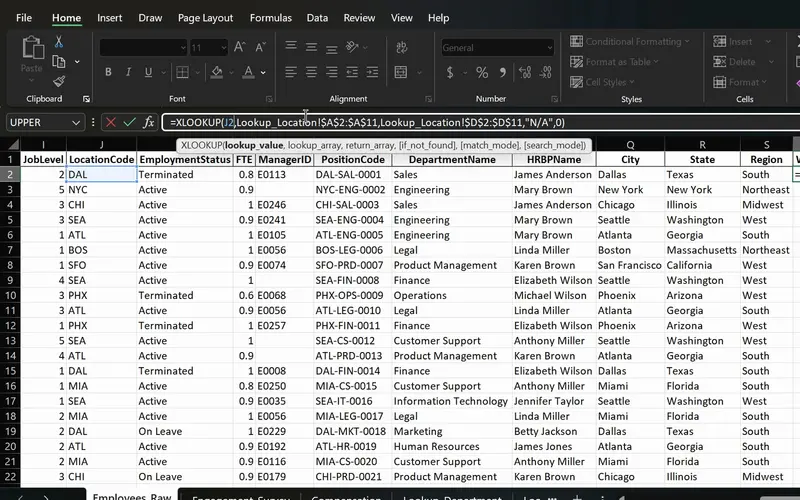
Project 06
PeopleInsight HR workbook
Employee data joined across sheets with one formula.
Use XLOOKUP to verify codes against a separate sheet and show a readable message when a code is missing instead of an error. Break a code such as DAL-SAL-0001 into its components.
-
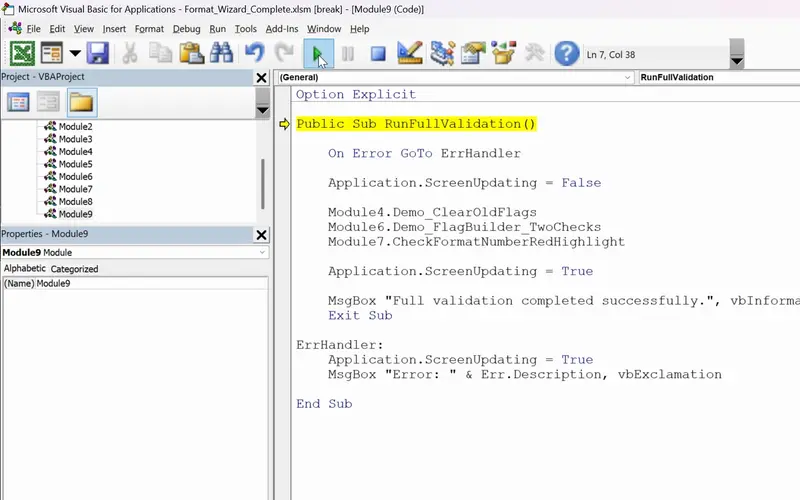
Project 11
FormatWizard
One click that checks a whole sheet for you.
Build a button-run routine for consistent daily file formatting: record the steps as a macro and store them in a macro-enabled workbook.
-
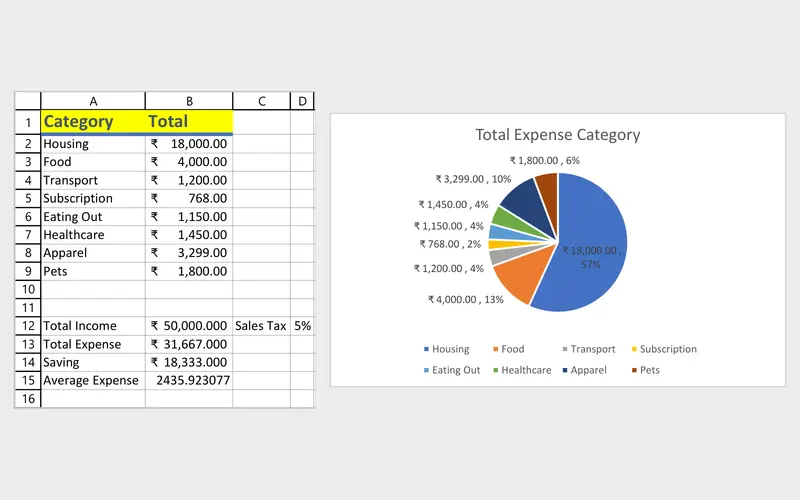
Project 01
Personal Budget Tracker
Your first workbook: where the money goes each month.
Learn on a small sheet how cells, data types, and number and date formats work, including the error values that appear after a mistyped entry.
-
Project 02
Dunder Michael Paper Company employee database
Practise turning a lengthy, messy list into something ready to sort, filter and print by removing duplicates, trimming unwanted spaces and separating first names from last names.
Lessons
The lessons that matter, in course order.
The Complete Excel Course with AI Integration has 186 lessons. This page picks out 44 of them, 3 h 45 min of video. Each lesson keeps its number in the course.
Where to start
Lesson 1 Introduction
Your starting point depends on what you already do in Excel. New users should begin with Lesson 1; the lessons after it on cells, data types and formats explain how entries are stored. If cell formatting and simple formulas are familiar, start with Lesson 19. This path includes the whole Managing data in Excel section, available free by email with practice files; request it on the course page. If you routinely clean lists already, start at Lesson 67 for lookup checks, then continue to recorded macros.
44 of 186 lessons · 3 h 45 min
01 Microsoft Excel fundamentals: building a foundation from scratch Learn how entries behave through cells, sheets, data types and the Excel window. Cover number and date formats, simple formulas, AutoFit and the #### error, along with VALUE and NAME errors caused by incorrect entries.
- 1 Start here Introduction Free preview 2 min
- 2 Course overview What you will learn in this Excel and AI course Free preview 5 min
- 3 The Excel interface Ribbon, tabs, name box, formula bar and navigation Free preview 13 min
- 4 Workbooks and worksheets in Excel Add, rename, move and navigate sheets Free preview 6 min
- 5 Your first Excel spreadsheet Cells, rows, columns and data types in a budget 8 min
- 6 Number formatting in Excel Currency, date and percentage formats for a budget 5 min
- 7 Cell formatting in Excel AutoFit column width, the #### error and cell styles 6 min
- 8 Basic maths in Excel Add, subtract, multiply and divide with formulas 3 min
- 9 SUM and AutoSum in Excel Total income, expenses and savings with MAX 6 min
- 10 Relative vs absolute references in Excel Dollar signs and mixed references 3 min
- 11 Calculating percentages in Excel Each expense as a percentage of income 2 min
- 12 Common Excel errors and how to fix them DIV0, NAME, VALUE errors and IFERROR 4 min
- 13 Organising an Excel workbook Dashboard, transactions and notes sheets 2 min
02 Project: personal budget tracker A budget introduces conditional formatting through icon sets, data bars and highlight rules. Apply those highlight rules to a data sheet to draw attention to values beyond the range you expect.
- 15 Conditional formatting in Excel Highlight rules, data bars and icon sets 3 min
03 Managing data in Excel: sort, filter and tables (Dunder Michael Paper employee database) Organise lengthy records with Excel Tables, filters and sorting. Clean them using Find and Replace, TRIM, Paste Special values and Remove Duplicates, split fields with Text to Columns and Flash Fill, then work with Freeze Panes and print settings.
- 19 Excel tables Create and format a table, structured references and total row 8 min
- 20 Sorting data in Excel Single and multi-level sort on an employee database 6 min
- 21 Filtering data in Excel AutoFilter, text and number filters on employee data 10 min
- 22 Cleaning data in Excel TRIM, Paste Special values and Find and Replace 13 min
- 23 Remove duplicates in Excel Find and delete duplicate rows in an employee list 6 min
- 24 Flash Fill in Excel Split first and last names automatically 3 min
- 25 Text to Columns in Excel Split data by delimiter into separate columns 6 min
- 26 Freeze panes in Excel Lock header rows and columns while scrolling 3 min
- 27 Printing in Excel Print area, page orientation, scaling and page layout 6 min
04 Essential formulas and functions (IF, SUMIF and more) Check records for completeness before returning a file using COUNTA and unique counts. Use COUNT when the column contains numeric entries.
- 34 SUM, COUNT and COUNTA in Excel SUM with FILTER and counting numbers with COUNT 7 min
- 35 SUM, COUNT and COUNTA in Excel COUNTA, unique counts and completeness checks 4 min
05 Text functions and data validation (enhancing data quality) Work towards cleaning a messy employee list: control entry with data validation drop-down lists, replace values with SUBSTITUTE, combine fields with CONCAT and TEXTJOIN, and tidy text with PROPER, LOWER, UPPER and TRIM.
- 41 CONCAT, the & operator and TEXTJOIN in Excel Combine text from multiple cells 6 min
- 42 TRIM, UPPER, LOWER and PROPER in Excel Clean messy text and fix capitalisation 6 min
- 43 FIND, SEARCH and SUBSTITUTE in Excel Locate and replace text with formulas 5 min
- 44 Text to Columns wizard in Excel Split a column by a comma delimiter 4 min
- 45 Data validation in Excel Create drop-down lists for consistent data entry 4 min
- 46 Ninja Challenge: problem Clean messy data with text functions and validation 4 min
- 47 Ninja Challenge: solution PROPER, Text to Columns and drop-down lists 7 min
08 Advanced Excel functions: lookups, text and arrays Practise checking an HR dataset against a master list with XLOOKUP and VLOOKUP. Flag missing codes with IFERROR or XLOOKUP's if-not-found value, and extract code components with MID, RIGHT and LEFT.
- 67 Lookup functions in Excel The PeopleInsight HR dataset and why lookups matter 2 min
- 68 VLOOKUP in Excel Find employee data across sheets with exact match 4 min
- 69 XLOOKUP in Excel Exact match, if not found and two-way lookup 6 min
- 70 IFERROR in Excel Handle lookup errors in VLOOKUP and XLOOKUP formulas 3 min
- 71 INDEX and MATCH in Excel A flexible alternative to VLOOKUP 6 min
- 72 CONCAT and TEXTJOIN in Excel Combine employee names and text with a delimiter 3 min
- 73 LEFT, RIGHT and MID in Excel Extract parts of a text code like DAL-SAL-0001 7 min
14 VBA and macros in Excel: FormatWizard Follow the recorded-macro portion of FormatWizard, saving the workbook as XLSM and running recorded formatting from a button. Record the steps once and use relative references so they work from any starting cell. The later FormatWizard lessons on writing VBA sit outside this path.
- 136 Excel macros and VBA for beginners What macros are, the FormatWizard project 3 min
- 137 Record your first Excel macro Name, run and use absolute references 6 min
- 138 Relative references in Excel macros Make recorded macros dynamic 4 min
- 139 Developer Tab in Excel Run macros from a button and the quick access toolbar 4 min
- 140 Save macros in Excel Macro-enabled workbooks and the XLSM file format 3 min
Instructors
Who teaches it.

Instructor, Excel with AI
Virginia Thorn
Emmy Award winner. Teaches Excel with AI at Coding Liquids.
Questions
Asked before starting.
Which Excel course covers the work of a data entry operator?
The Complete Excel Course with AI Integration from Coding Liquids covers Excel tasks used in data entry, from preparing formats and drop-down lists to cleaning pasted records and separating names and codes. It also teaches batch checks for missing or incorrect records and a recorded macro for recurring formatting. The selection on this page contains 44 lessons, taking 3 hours 45 minutes of the course's 16 hours.
Can a data entry operator work faster after taking this course?
Yes, for the Excel tasks surrounding typing. In The Complete Excel Course with AI Integration, Flash Fill and Text to Columns reduce retyping, while TRIM, PROPER and Find and Replace let you correct a column at a time. A macro launched from a button handles recurring daily formatting. The course does not teach typing speed or accuracy drills, Google Sheets or form builders.
How can a data entry operator check entered records for errors?
Use the checks taught in The Complete Excel Course with AI Integration: compare codes with a master list through XLOOKUP and handle missing codes with IFERROR, remove repeated rows with Remove Duplicates, and colour values beyond your chosen range with highlight rules. COUNTA and unique counts help reveal incomplete records, while drop-down lists reject entries outside the permitted list.
Does a data entry operator need to learn VBA?
No. The selected lessons in The Complete Excel Course with AI Integration finish with recorded macros, so you can record formatting steps once, run them through a button and save a macro-enabled workbook without writing code. FormatWizard continues with optional VBA lessons if you later want to create a macro that checks a sheet row by row.
Excel with AI
See the whole course.
The Complete Excel Course with AI Integration: 16 hours of video in 186 lessons, built around 14 projects, with lifetime access, a Certificate of Completion and a 14-day money-back guarantee.
The same course
For another job, level or topic.
By job
Finance and accounting
- Accountants and finance teams
- Bookkeepers and accounts assistants
- FP&A and budget analysts
- Auditors and fraud examiners
- Payroll administrators
- Tax accountants and advisers
- Banking professionals
- Cost and management accountants
- Financial controllers
- Credit control and receivables teams
- Accounts payable teams
- Financial planners and advisers
- Credit analysts and loan officers
- Insurance underwriters
- Insurance claims handlers
- Reconciliation analysts
- Treasury analysts
- Medical billing and coding specialists
- Fund accountants
- Billing administrators
- AML and KYC analysts
- Actuarial analysts
- Insurance agents and brokers
HR and office administration
Operations and supply chain
- Operations and project managers
- Procurement and purchasing officers
- Logistics coordinators
- Inventory controllers and storekeepers
- Supply chain analysts
- Warehouse managers and supervisors
- PMO analysts
- Import and export coordinators
- Production planners
- Demand planners
- Fleet and transport managers
- Apparel merchandisers
Data and reporting
Sales, marketing and customer service
Business and management
Engineering, construction and manufacturing
- Quantity surveyors and estimators
- Civil and site engineers
- Quality managers and engineers
- Construction project managers
- Health and safety officers
- Document controllers
- Production managers and supervisors
- Mechanical and electrical engineers
- Industrial engineers
- Planning engineers
- Sustainability and ESG analysts
- Maintenance planners