



The Complete Excel Course with AI Integration
Excel course for IT support and asset managers
For IT support analysts and IT asset managers who keep registers, licence lists and ticket reports in Excel. This page picks out the parts of The Complete Excel Course with AI Integration that this work uses: list skills for the asset register, IF and COUNTIFS for rules and counts, date functions for device age and renewals, lookups between lists, PivotTables for ticket reports, and TaskFlow for renewals that must not be missed.
Taught by Sagnik Bhattacharya and Virginia Thorn

What you will be able to do
At work, you will be able to:
- Keep a hardware asset register as an Excel Table with owners and locations, sorted, filtered and free of duplicate entries.
- Track software licences and their renewal dates, with expired ones highlighted and the working days left counted with NETWORKDAYS.
- Report ticket volumes by category and month, and resolution times by team, with PivotTables, slicers and PivotCharts.
- Flag devices for replacement by age with TODAY, date arithmetic and IFS.
- Clean an inventory export with TRIM, Find and Replace and Remove Duplicates, and find the devices missing from another list with XLOOKUP.
Projects
What you will build.
The course has 14 projects. These four matter most here.
-
Project 07
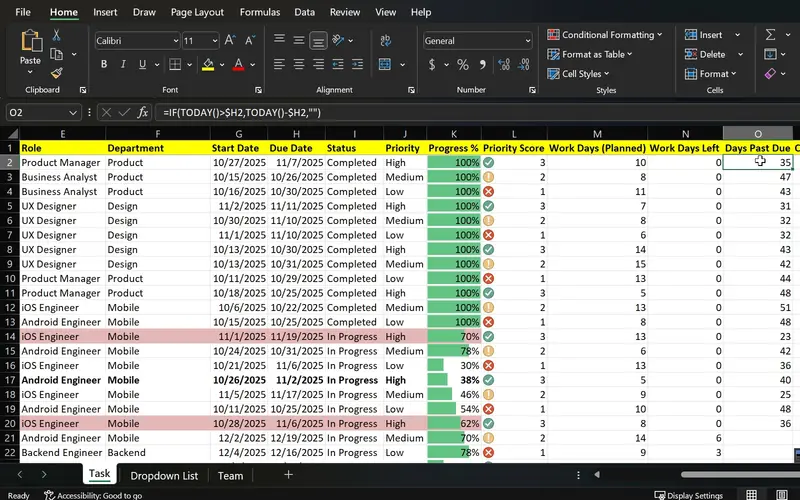
TaskFlow
One sheet that shows what is done, what is late and what is urgent.
Built for tasks, it also holds licence renewals and support contracts with their dates: days left counted with NETWORKDAYS, anything expired in colour, and a status per item picked from a list.
-
Project 05
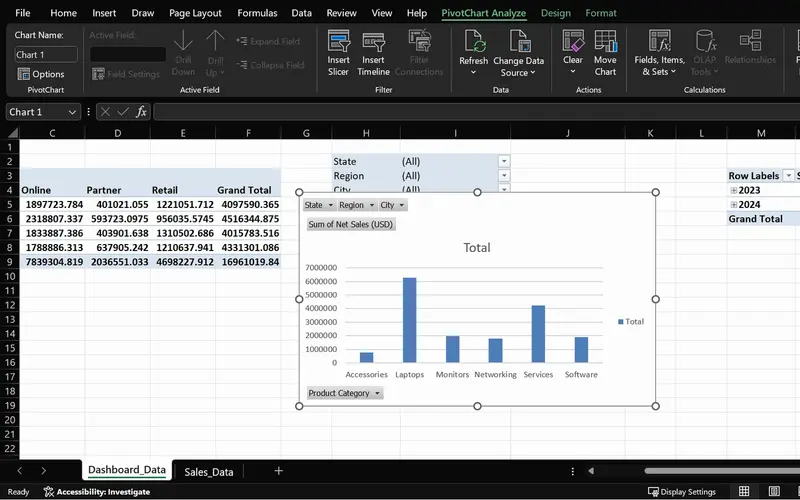
SalesPlusPerformance
A sales question answered in seconds, straight from the order data.
Ticket volumes by category and month, and resolution times by team, from the same PivotTable steps the project applies to orders.
-
Project 06
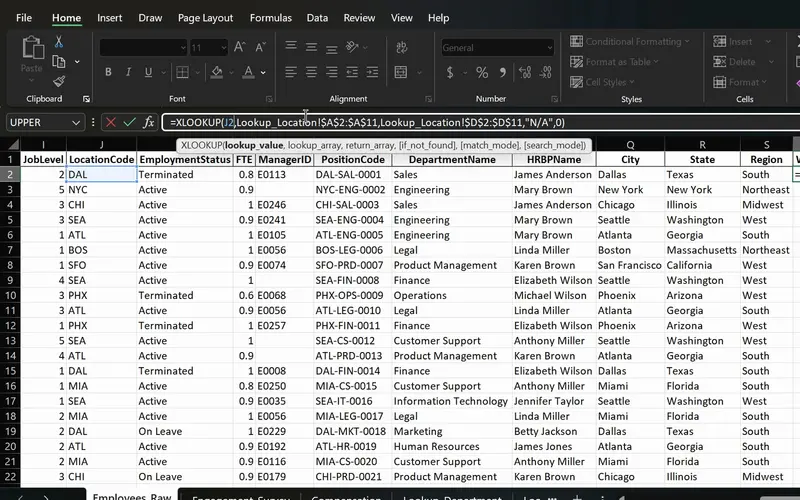
PeopleInsight HR workbook
Employee data joined across sheets with one formula.
Owners and departments brought into the asset register from the staff list with XLOOKUP, and devices missing from one export found through its if-not-found value.
-
Project 02
Dunder Michael Paper Company employee database
An asset register is a long list too: practised on employee records, the same Tables, filters, duplicate removal and print settings keep devices, owners and locations in order.
Lessons
The lessons that matter, in course order.
The Complete Excel Course with AI Integration has 186 lessons. This page picks out 53 of them, 4 h 33 min of video. Each lesson keeps its number in the course.
Where to start
Lesson 19 Excel tables
Begin at Lesson 19 if you already keep lists in Excel. New to Excel? Begin at Lesson 1. If your register is already a clean table, go to Lesson 57 for ticket reports with PivotTables. Ask for Managing data in Excel on the course page: it is free by email with its practice files and holds the lessons for the register.
53 of 186 lessons · 4 h 33 min
03 Managing data in Excel: sort, filter and tables (Dunder Michael Paper employee database) The asset register and inventory exports: Excel Tables, sorting and filtering by location or owner, TRIM and Find and Replace for messy exports, Remove Duplicates for devices listed twice, Text to Columns, Freeze Panes and print settings for an audit sheet.
- 19 Start here Excel tables Create and format a table, structured references and total row 8 min
- 20 Sorting data in Excel Single and multi-level sort on an employee database 6 min
- 21 Filtering data in Excel AutoFilter, text and number filters on employee data 10 min
- 22 Cleaning data in Excel TRIM, Paste Special values and Find and Replace 13 min
- 23 Remove duplicates in Excel Find and delete duplicate rows in an employee list 6 min
- 24 Flash Fill in Excel Split first and last names automatically 3 min
- 25 Text to Columns in Excel Split data by delimiter into separate columns 6 min
- 26 Freeze panes in Excel Lock header rows and columns while scrolling 3 min
- 27 Printing in Excel Print area, page orientation, scaling and page layout 6 min
04 Essential formulas and functions (IF, SUMIF and more) Rules for the register: IF and IFS to flag a device for replacement by its age, AND and OR for combined rules, COUNTIF and COUNTIFS for devices by location and tickets by category, and TODAY with date arithmetic for device age, renewal dates and resolution times. The lessons use sales data.
- 28 Logical functions in Excel TRUE and FALSE comparisons for beginners 5 min
- 29 The IF function in Excel Pass or fail results with a single condition 3 min
- 30 IF function practice in Excel Categorise sales data with IF formulas 6 min
- 31 Nested IF and IFS in Excel Customer value tiers with nested IF 6 min
- 32 Nested IF and IFS in Excel Sales performance labels with the IFS function 5 min
- 33 AND and OR with IF in Excel Flag high-value deals with multiple conditions 8 min
- 34 SUM, COUNT and COUNTA in Excel SUM with FILTER and counting numbers with COUNT 7 min
- 35 SUM, COUNT and COUNTA in Excel COUNTA, unique counts and completeness checks 4 min
- 36 SUMIF and COUNTIF in Excel Conditional sum and count with one criterion 8 min
- 37 SUMIFS and COUNTIFS in Excel Sum and count with multiple criteria 7 min
- 38 The Excel function library Insert Function dialog and Formula AutoComplete 5 min
- 39 Date and time functions in Excel TODAY, NOW, MONTH and date arithmetic 6 min
- 40 Excel Ninja Challenge COUNTIF, SUMIF, IF, COUNTIFS, SUMIFS and IFS practice 8 min
07 PivotTables and PivotCharts: data analysis made easy PivotTables for ticket volumes by category and month, resolution times by team through Value Field Settings, slicers and PivotCharts for a simple IT dashboard, and a refresh when the next export lands. The lessons use sales data.
- 57 PivotTables 101 in Excel What a PivotTable does and the sales dataset 5 min
- 58 Preparing data for PivotTables Clean data with TRIM, PROPER, find and replace 5 min
- 59 Create your first PivotTable in Excel Insert a PivotTable from a sales table 1 min
- 60 PivotTable fields in Excel Rows, values, columns and Value Field Settings 2 min
- 61 PivotTable summaries in Excel Sales by product category and grouping by date 4 min
- 62 Slicers in Excel Filter PivotTables with clickable buttons 3 min
- 63 PivotCharts in Excel Create interactive charts from a PivotTable 5 min
- 64 PivotTable design Tab Report layouts, PivotTable styles and number formats 5 min
- 65 Refresh a PivotTable in Excel Update pivots when source data changes 2 min
- 66 Excel Ninja Challenge PivotTable sales by region, category and monthly trend 1 min
08 Advanced Excel functions: lookups, text and arrays Lookups between lists: XLOOKUP, VLOOKUP and INDEX and MATCH to bring an owner's department into the register, IFERROR and the if-not-found value for devices missing from one export, NETWORKDAYS for resolution in working days, and FILTER and SORT for the devices due for replacement. The lessons use an HR dataset.
- 67 Lookup functions in Excel The PeopleInsight HR dataset and why lookups matter 2 min
- 68 VLOOKUP in Excel Find employee data across sheets with exact match 4 min
- 69 XLOOKUP in Excel Exact match, if not found and two-way lookup 6 min
- 70 IFERROR in Excel Handle lookup errors in VLOOKUP and XLOOKUP formulas 3 min
- 71 INDEX and MATCH in Excel A flexible alternative to VLOOKUP 6 min
- 72 CONCAT and TEXTJOIN in Excel Combine employee names and text with a delimiter 3 min
- 73 LEFT, RIGHT and MID in Excel Extract parts of a text code like DAL-SAL-0001 7 min
- 74 TODAY, EOMONTH and NETWORKDAYS in Excel Date calculations for HR data 5 min
- 75 UNIQUE function in Excel Extract a distinct list with dynamic arrays 6 min
- 76 FILTER function in Excel Dynamic array filtering with AND and OR criteria 5 min
- 77 SORT and SORTBY in Excel Sort data dynamically with formulas 4 min
- 78 Excel Ninja Challenge XLOOKUP, totals and text concatenation lookup challenge 3 min
09 Project: task automation with data validation and forms TaskFlow, a task tracker that also holds licence renewals: status and priority drop-downs, overdue items highlighted, a timeline, working days left with NETWORKDAYS and TODAY, and a protected sheet.
- 79 TaskFlow project tracker in Excel Overview of the task tracker dashboard 4 min
- 80 Designing a task tracker in Excel TaskFlow layout, columns and headers 5 min
- 81 Data validation in Excel Status and priority drop-down lists in TaskFlow 8 min
- 82 Conditional formatting in Excel Highlight overdue and completed tasks 8 min
- 83 Gantt chart in Excel Build a project timeline with conditional formatting 6 min
- 84 Data bars and icon sets in Excel Visual priority and progress in TaskFlow 6 min
- 85 NETWORKDAYS and TODAY in Excel Days remaining and task deadlines in TaskFlow 5 min
- 86 Protect a sheet and lock cells in Excel Secure the TaskFlow tracker workbook 4 min
- 87 Testing an Excel task tracker Stress test TaskFlow with sample data 3 min
Instructors
Who teaches it.

Instructor, Excel with AI
Virginia Thorn
Emmy Award winner. Teaches Excel with AI at Coding Liquids.
Questions
Asked before starting.
Is there an Excel course for IT support and asset managers?
Yes. The Complete Excel Course with AI Integration from Coding Liquids covers the Excel side of IT support and asset work: a hardware register kept as an Excel Table, licence renewals with highlighted dates, ticket volumes and resolution times in PivotTables, replacement flags by device age, and clean inventory exports. This page lists 53 lessons for that work, 4 hours 33 minutes of the course's 16 hours.
Can I keep an IT asset register in Excel?
Yes. The Complete Excel Course with AI Integration teaches the pieces on its own employee database and HR data: an Excel Table that sorts and filters by location or owner, Remove Duplicates for devices listed twice, XLOOKUP to bring in each owner's department, and IFS with TODAY to flag a device by its age. The course has no IT asset data of its own.
Does it cover ITIL or a service desk tool?
No. The Complete Excel Course with AI Integration teaches Excel: IT service management tools, ITIL and endpoint management are not covered. Its lessons apply to what those tools export, such as a ticket list or an inventory file, once it is in a spreadsheet.
How do I report ticket volumes and resolution times?
With PivotTables, which The Complete Excel Course with AI Integration teaches on sales data: tickets counted by category and grouped by month, resolution time averaged by team through Value Field Settings, slicers to filter by team, and PivotCharts for the trend. Resolution time itself is the closed date minus the opened date, or NETWORKDAYS for working days.
Excel with AI
See the whole course.
The Complete Excel Course with AI Integration: 16 hours of video in 186 lessons, built around 14 projects, with lifetime access, a Certificate of Completion and a 14-day money-back guarantee.
The same course
For another job, level or topic.
By job
Finance and accounting
- Accountants and finance teams
- Bookkeepers and accounts assistants
- FP&A and budget analysts
- Auditors and fraud examiners
- Payroll administrators
- Tax accountants and advisers
- Banking professionals
- Cost and management accountants
- Financial controllers
- Credit control and receivables teams
- Accounts payable teams
- Financial planners and advisers
- Credit analysts and loan officers
- Insurance underwriters
- Insurance claims handlers
- Reconciliation analysts
- Treasury analysts
- Medical billing and coding specialists
- Fund accountants
- Billing administrators
- AML and KYC analysts
- Actuarial analysts
- Insurance agents and brokers
HR and office administration
Operations and supply chain
- Operations and project managers
- Procurement and purchasing officers
- Logistics coordinators
- Inventory controllers and storekeepers
- Supply chain analysts
- Warehouse managers and supervisors
- PMO analysts
- Import and export coordinators
- Production planners
- Demand planners
- Fleet and transport managers
- Apparel merchandisers
Data and reporting
Sales, marketing and customer service
Business and management
Engineering, construction and manufacturing
- Quantity surveyors and estimators
- Civil and site engineers
- Quality managers and engineers
- Construction project managers
- Health and safety officers
- Document controllers
- Production managers and supervisors
- Mechanical and electrical engineers
- Industrial engineers
- Planning engineers
- Sustainability and ESG analysts
- Maintenance planners