



The Complete Excel Course with AI Integration
Excel course for business analysts
This guide is designed for business analysts and business systems analysts who audit source extracts, align datasets across platforms, and present answers to stakeholders. It highlights the modules from The Complete Excel Course with AI Integration that serve this work: cleaning raw files, identifying mismatches with lookups and text tools, tracking operational performance with dates and COUNTIFS, summarising findings in PivotTables, and using AI to structure and review analysis.
Taught by Sagnik Bhattacharya and Virginia Thorn

What you will be able to do
At work, you will be able to:
- Audit an incoming extract for gaps and distinct values using COUNTA and UNIQUE, followed by tidying using TRIM, Text to Columns and Remove Duplicates.
- Reconcile items between legacy and target systems by applying XLOOKUP with its if-not-found parameter, isolating unmatched entries through FILTER.
- Maintain a test log or requirements traceability matrix inside an Excel Table equipped with status drop-down menus, filtering, and COUNTIFS summaries.
- Track process performance by calculating cycle durations via date arithmetic and NETWORKDAYS, tallying volumes with COUNTIFS, and grouping backlogs by month in PivotTables.
- Address ad-hoc stakeholder inquiries using interactive PivotTables, slicers and PivotCharts instead of assembling a one-off sheet of formulas.
- Plan an analysis with ChatGPT, draft an overview using Copilot, and check both against the data with a QA checklist.
Projects
What you will build.
The course has 14 projects. These four matter most here.
-
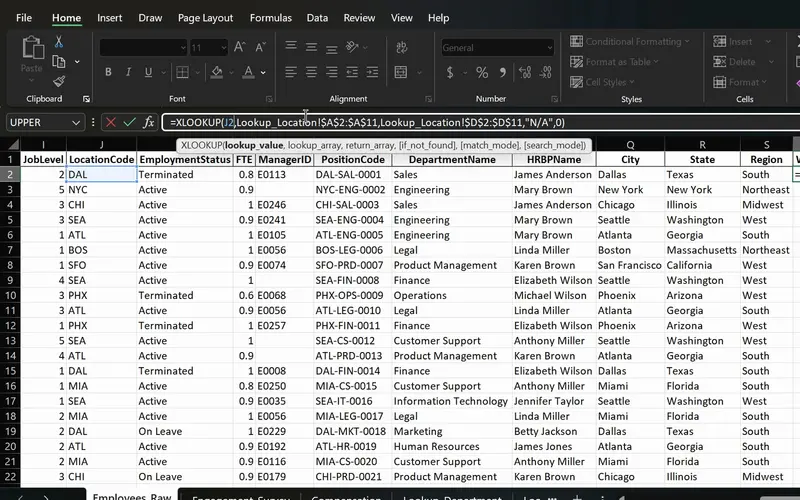
Project 06
PeopleInsight HR workbook
Employee data joined across sheets with one formula.
Core formulas for cross-system data mapping: verify identifier keys against destination tables, return explicit alerts for missing entries, and generate dynamic lists of unmapped items.
-
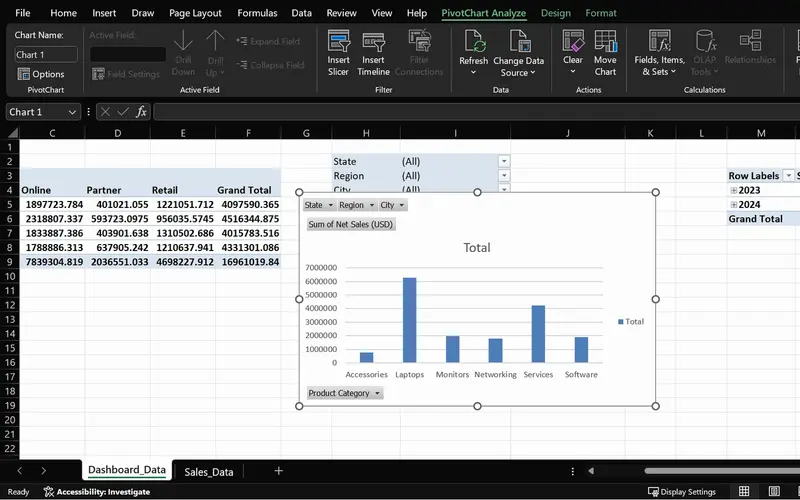
Project 05
SalesPlusPerformance
A sales question answered in seconds, straight from the order data.
Prompt answers during business meetings: place dimensions into rows or slicer controls to deliver clear figures to decision-makers before discussions conclude.
-
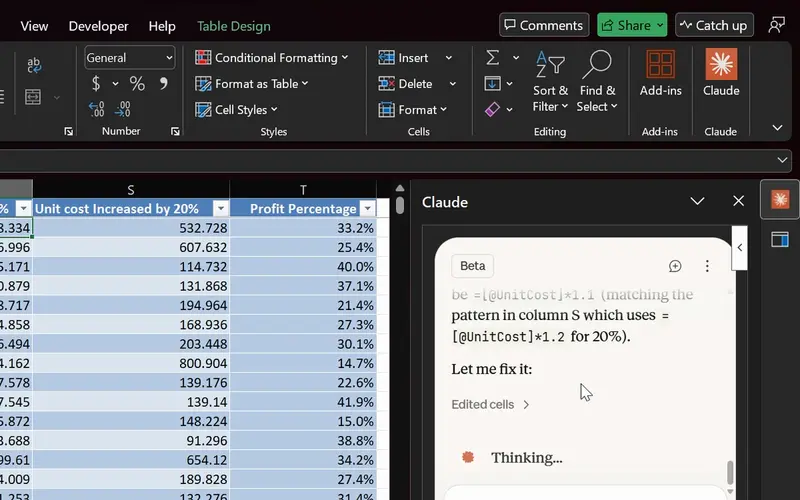
Project 14
Agentic AI in Excel
AI finds and fixes the formula; you check it before it counts.
Supervised artificial intelligence: produce initial narrative summaries or calculations with Copilot and ChatGPT, followed by checks against raw data before publishing.
-
Project 02
Dunder Michael Paper Company employee database
Hands-on data profiling: isolate irregular records with sorting and filters, purge unwanted spaces and duplicate rows, and separate combined values across distinct columns.
Lessons
The lessons that matter, in course order.
The Complete Excel Course with AI Integration has 186 lessons. This page picks out 51 of them, 4 h 10 min of video. Each lesson keeps its number in the course.
Where to start
Lesson 19 Excel tables
Start at Lesson 19 if basic cell entry and straightforward formulas are familiar: data extract profiling commences with filters and Excel Tables. That section, Managing data in Excel, is free by email with its practice files if you want to sample the course first: ask for it on the course page. Anyone entirely new to spreadsheets should begin at Lesson 1. If lookup formulas are already routine, advance directly to Lesson 88 for the AI lessons.
51 of 186 lessons · 4 h 10 min
03 Managing data in Excel: sort, filter and tables (Dunder Michael Paper employee database) Techniques for inspecting and sanitising raw exports: configure Excel Tables, filter and sort to expose anomalies, apply TRIM, Paste Special and Find and Replace, eliminate duplicates, divide combined columns with Flash Fill and Text to Columns, and manage views with freeze panes and print options. The lessons use an employee database.
- 19 Start here Excel tables Create and format a table, structured references and total row 8 min
- 20 Sorting data in Excel Single and multi-level sort on an employee database 6 min
- 21 Filtering data in Excel AutoFilter, text and number filters on employee data 10 min
- 22 Cleaning data in Excel TRIM, Paste Special values and Find and Replace 13 min
- 23 Remove duplicates in Excel Find and delete duplicate rows in an employee list 6 min
- 24 Flash Fill in Excel Split first and last names automatically 3 min
- 25 Text to Columns in Excel Split data by delimiter into separate columns 6 min
- 26 Freeze panes in Excel Lock header rows and columns while scrolling 3 min
- 27 Printing in Excel Print area, page orientation, scaling and page layout 6 min
04 Essential formulas and functions (IF, SUMIF and more) Quantifying operational records: aggregate data with SUM, COUNT and COUNTA, run completeness evaluations and distinct counts, segment volumes across teams or stages with SUMIF, SUMIFS and COUNTIFS, and calculate turnaround times through date arithmetic. The lessons use sales figures.
- 34 SUM, COUNT and COUNTA in Excel SUM with FILTER and counting numbers with COUNT 7 min
- 35 SUM, COUNT and COUNTA in Excel COUNTA, unique counts and completeness checks 4 min
- 36 SUMIF and COUNTIF in Excel Conditional sum and count with one criterion 8 min
- 37 SUMIFS and COUNTIFS in Excel Sum and count with multiple criteria 7 min
- 38 The Excel function library Insert Function dialog and Formula AutoComplete 5 min
- 39 Date and time functions in Excel TODAY, NOW, MONTH and date arithmetic 6 min
05 Text functions and data validation (enhancing data quality) Text manipulation and input control for integration keys: assemble composite identifiers using CONCAT and TEXTJOIN, standardise code formats via TRIM, UPPER and PROPER, modify strings using FIND, SEARCH and SUBSTITUTE, split values with Text to Columns, and establish status drop-down menus using data validation.
- 41 CONCAT, the & operator and TEXTJOIN in Excel Combine text from multiple cells 6 min
- 42 TRIM, UPPER, LOWER and PROPER in Excel Clean messy text and fix capitalisation 6 min
- 43 FIND, SEARCH and SUBSTITUTE in Excel Locate and replace text with formulas 5 min
- 44 Text to Columns wizard in Excel Split a column by a comma delimiter 4 min
- 45 Data validation in Excel Create drop-down lists for consistent data entry 4 min
07 PivotTables and PivotCharts: data analysis made easy PivotTables for stakeholder requests: aggregate totals across categories, group transactional dates, introduce slicers for filtering, construct dynamic PivotCharts, and refresh the PivotTable when the extract changes. The lessons use sales orders.
- 57 PivotTables 101 in Excel What a PivotTable does and the sales dataset 5 min
- 58 Preparing data for PivotTables Clean data with TRIM, PROPER, find and replace 5 min
- 59 Create your first PivotTable in Excel Insert a PivotTable from a sales table 1 min
- 60 PivotTable fields in Excel Rows, values, columns and Value Field Settings 2 min
- 61 PivotTable summaries in Excel Sales by product category and grouping by date 4 min
- 62 Slicers in Excel Filter PivotTables with clickable buttons 3 min
- 63 PivotCharts in Excel Create interactive charts from a PivotTable 5 min
- 64 PivotTable design Tab Report layouts, PivotTable styles and number formats 5 min
- 65 Refresh a PivotTable in Excel Update pivots when source data changes 2 min
- 66 Excel Ninja Challenge PivotTable sales by region, category and monthly trend 1 min
08 Advanced Excel functions: lookups, text and arrays System data reconciliation and advanced lookups: locate cross-system entities using VLOOKUP, INDEX and MATCH, or XLOOKUP with fallback handling, trap lookup exceptions with IFERROR, parse string tokens using LEFT, MID and RIGHT, measure business days with NETWORKDAYS, and isolate unmatched rows using SORT, UNIQUE and FILTER.
- 67 Lookup functions in Excel The PeopleInsight HR dataset and why lookups matter 2 min
- 68 VLOOKUP in Excel Find employee data across sheets with exact match 4 min
- 69 XLOOKUP in Excel Exact match, if not found and two-way lookup 6 min
- 70 IFERROR in Excel Handle lookup errors in VLOOKUP and XLOOKUP formulas 3 min
- 71 INDEX and MATCH in Excel A flexible alternative to VLOOKUP 6 min
- 72 CONCAT and TEXTJOIN in Excel Combine employee names and text with a delimiter 3 min
- 73 LEFT, RIGHT and MID in Excel Extract parts of a text code like DAL-SAL-0001 7 min
- 74 TODAY, EOMONTH and NETWORKDAYS in Excel Date calculations for HR data 5 min
- 75 UNIQUE function in Excel Extract a distinct list with dynamic arrays 6 min
- 76 FILTER function in Excel Dynamic array filtering with AND and OR criteria 5 min
- 77 SORT and SORTBY in Excel Sort data dynamically with formulas 4 min
- 78 Excel Ninja Challenge XLOOKUP, totals and text concatenation lookup challenge 3 min
10 Boosting productivity with AI in Excel (Copilot, ChatGPT and Claude) Understanding generative AI capabilities and boundaries: evaluate what Claude, ChatGPT and Copilot can realistically accomplish, format worksheet tables for Copilot compatibility, draft high-level management summaries, and distinguish effective prompts from poor ones.
- 88 AI in Excel What Copilot, ChatGPT and Claude can and cannot do 8 min
- 89 Prepare data for Copilot in Excel Tables, headers and clean structure 6 min
- 90 Copilot executive summary in Excel Summarise a dataset in seconds with AI 5 min
- 91 Copilot prompts for Excel Weak vs strong prompts and the PRO prompt pattern 5 min
10 Boosting productivity with AI in Excel (Copilot, ChatGPT and Claude) Applying AI tools directly to spreadsheets: employ Copilot to detect anomalous rows, clean untidy entries and assemble compact dashboards, structure analytical plans with ChatGPT beforehand, and systematically audit generated output against a QA checklist.
- 96 Find outliers with Copilot in Excel Discounts, negative profit, suspect rows 7 min
- 97 Clean messy data with Copilot in Excel AI prompts plus Excel functions 4 min
- 98 Mini dashboard with Copilot in Excel KPIs, charts and slicers on one page 3 min
- 99 Check AI output in Excel A quick QA checklist for Copilot results 2 min
- 100 ChatGPT as your analysis planner Plan an Excel analysis before you build it 3 min
Instructors
Who teaches it.

Instructor, Excel with AI
Virginia Thorn
Emmy Award winner. Teaches Excel with AI at Coding Liquids.
Questions
Asked before starting.
Is there an Excel course for a business analyst?
Yes, addressing the data tasks in the role. The Complete Excel Course with AI Integration from Coding Liquids covers the tools for inspecting and tidying raw extracts, reconciling cross-system datasets using XLOOKUP and FILTER, tracking operational counts with dates and COUNTIFS, answering business questions using PivotTables, and working with Copilot alongside ChatGPT. The curriculum does not include process modelling or writing requirements. The 51 lessons highlighted on this page run to 4 hours 10 minutes.
Can a business systems analyst use Excel to reconcile data between legacy and replacement systems?
Yes. The Complete Excel Course with AI Integration teaches XLOOKUP with its if-not-found argument, which lets you display informative text rather than calculation errors when records do not appear in the replacement platform, while FILTER extracts unmatched items into a dedicated list. String utilities like TRIM, UPPER and SUBSTITUTE harmonise code variations prior to comparison, and COUNTIFS calculates the frequency of each discrepancy category.
Does the course teach SQL, Power BI or process modelling for a business analyst?
No. The Complete Excel Course with AI Integration focuses on Excel. It omits SQL, Power BI, process modelling in BPMN or Visio, and business analysis methods like BABOK. Data exported from a query or a report as a spreadsheet or a CSV file is where its lessons apply.
Are the artificial intelligence modules helpful for a business analyst?
For data tasks, yes. In The Complete Excel Course with AI Integration, ChatGPT helps plan an analysis before it is constructed, while Copilot drafts an executive summary of a table and detects outliers. A QA checklist outlines what to verify before numbers enter a report, and the lessons check AI output at each step before it is used.
Excel with AI
See the whole course.
The Complete Excel Course with AI Integration: 16 hours of video in 186 lessons, built around 14 projects, with lifetime access, a Certificate of Completion and a 14-day money-back guarantee.
The same course
For another job, level or topic.
By job
Finance and accounting
- Accountants and finance teams
- Bookkeepers and accounts assistants
- FP&A and budget analysts
- Auditors and fraud examiners
- Payroll administrators
- Tax accountants and advisers
- Banking professionals
- Cost and management accountants
- Financial controllers
- Credit control and receivables teams
- Accounts payable teams
- Financial planners and advisers
- Credit analysts and loan officers
- Insurance underwriters
- Insurance claims handlers
- Reconciliation analysts
- Treasury analysts
- Medical billing and coding specialists
- Fund accountants
- Billing administrators
- AML and KYC analysts
- Actuarial analysts
- Insurance agents and brokers
HR and office administration
Operations and supply chain
- Operations and project managers
- Procurement and purchasing officers
- Logistics coordinators
- Inventory controllers and storekeepers
- Supply chain analysts
- Warehouse managers and supervisors
- PMO analysts
- Import and export coordinators
- Production planners
- Demand planners
- Fleet and transport managers
- Apparel merchandisers
Data and reporting
Sales, marketing and customer service
Business and management
Engineering, construction and manufacturing
- Quantity surveyors and estimators
- Civil and site engineers
- Quality managers and engineers
- Construction project managers
- Health and safety officers
- Document controllers
- Production managers and supervisors
- Mechanical and electrical engineers
- Industrial engineers
- Planning engineers
- Sustainability and ESG analysts
- Maintenance planners