
The Complete Excel Course with AI Integration
Excel course for HR teams
For HR teams and anyone who keeps employee data in Excel. The Complete Excel Course with AI Integration has HR datasets of its own: an employee database that you sort, filter and clean, and an HR workbook where records are joined across sheets. This page picks out those sections and the ones that support them.
Taught by Sagnik Bhattacharya and Virginia Thorn


What you will be able to do
At work, you will be able to:
- Keep an employee list in order with Excel Tables, sorting on several levels and filters.
- Clean a messy export: TRIM and PROPER for names, Remove Duplicates, and Flash Fill or Text to Columns to split a column.
- Stop wrong entries at the source with drop-down lists (data validation).
- Join employee records across sheets with VLOOKUP, XLOOKUP or INDEX and MATCH, and handle the gaps with IFERROR.
- Work out dates with TODAY, EOMONTH and NETWORKDAYS, and pull the parts out of a code such as DAL-SAL-0001 with LEFT, RIGHT and MID.
- Build lists that update themselves with UNIQUE, FILTER and SORT, and summarise a table with PivotTables and slicers.
Projects
What you will build.
The course has 14 projects. These two matter most here.
-
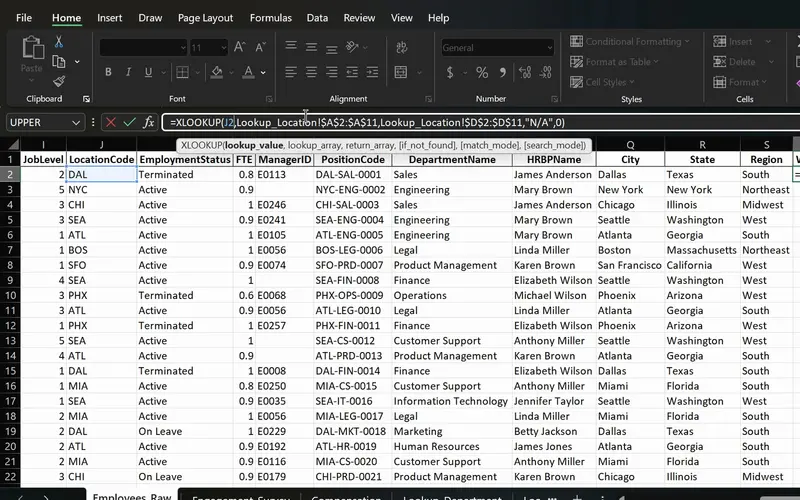
Project 06
PeopleInsight HR workbook
Employee data joined across sheets with one formula.
Employee records joined across sheets with one formula, dates worked out with EOMONTH and NETWORKDAYS, and lists that update when the data does.
-
Project 02
Dunder Michael Paper Company employee database
An employee list brought under control: sorted, filtered, cleaned of stray spaces and duplicates, with names split into their own columns.
Lessons
The lessons that matter, in course order.
The Complete Excel Course with AI Integration has 186 lessons. This page picks out 38 of them, 3 h 3 min of video. Each lesson keeps its number in the course.
Where to start
Lesson 19 Excel tables
Begin at Lesson 19 if you can already enter data and write a simple formula. New to Excel? Begin at Lesson 1: the opening sections teach the basics on a personal budget. If your lists are already clean and you only need lookups, go to Lesson 67.
38 of 186 lessons · 3 h 3 min
03 Managing data in Excel: sort, filter and tables (Dunder Michael Paper employee database) The Dunder Michael Paper Company employee database: Excel Tables, sorting, filtering, cleaning with TRIM and Find and Replace, removing duplicates, splitting names with Flash Fill and Text to Columns, freezing the header row and printing neatly.
- 19 Start here Excel tables Create and format a table, structured references and total row 8 min
- 20 Sorting data in Excel Single and multi-level sort on an employee database 6 min
- 21 Filtering data in Excel AutoFilter, text and number filters on employee data 10 min
- 22 Cleaning data in Excel TRIM, Paste Special values and Find and Replace 13 min
- 23 Remove duplicates in Excel Find and delete duplicate rows in an employee list 6 min
- 24 Flash Fill in Excel Split first and last names automatically 3 min
- 25 Text to Columns in Excel Split data by delimiter into separate columns 6 min
- 26 Freeze panes in Excel Lock header rows and columns while scrolling 3 min
- 27 Printing in Excel Print area, page orientation, scaling and page layout 6 min
05 Text functions and data validation (enhancing data quality) Text functions and drop-down lists, ending with a Ninja Challenge on a messy employee list that you fix with PROPER, Text to Columns and data validation.
- 41 CONCAT, the & operator and TEXTJOIN in Excel Combine text from multiple cells 6 min
- 42 TRIM, UPPER, LOWER and PROPER in Excel Clean messy text and fix capitalisation 6 min
- 43 FIND, SEARCH and SUBSTITUTE in Excel Locate and replace text with formulas 5 min
- 44 Text to Columns wizard in Excel Split a column by a comma delimiter 4 min
- 45 Data validation in Excel Create drop-down lists for consistent data entry 4 min
- 46 Ninja Challenge: problem Clean messy data with text functions and validation 4 min
- 47 Ninja Challenge: solution PROPER, Text to Columns and drop-down lists 7 min
07 PivotTables and PivotCharts: data analysis made easy PivotTables, slicers and PivotCharts. The lessons use sales data; the same steps count a table of people by department, location or month.
- 57 PivotTables 101 in Excel What a PivotTable does and the sales dataset 5 min
- 58 Preparing data for PivotTables Clean data with TRIM, PROPER, find and replace 5 min
- 59 Create your first PivotTable in Excel Insert a PivotTable from a sales table 1 min
- 60 PivotTable fields in Excel Rows, values, columns and Value Field Settings 2 min
- 61 PivotTable summaries in Excel Sales by product category and grouping by date 4 min
- 62 Slicers in Excel Filter PivotTables with clickable buttons 3 min
- 63 PivotCharts in Excel Create interactive charts from a PivotTable 5 min
- 64 PivotTable design Tab Report layouts, PivotTable styles and number formats 5 min
- 65 Refresh a PivotTable in Excel Update pivots when source data changes 2 min
- 66 Excel Ninja Challenge PivotTable sales by region, category and monthly trend 1 min
08 Advanced Excel functions: lookups, text and arrays The PeopleInsight HR dataset: VLOOKUP, XLOOKUP, INDEX and MATCH, IFERROR, text functions for names and employee codes, TODAY, EOMONTH and NETWORKDAYS for dates, then UNIQUE, FILTER, SORT and SORTBY.
- 67 Lookup functions in Excel The PeopleInsight HR dataset and why lookups matter 2 min
- 68 VLOOKUP in Excel Find employee data across sheets with exact match 4 min
- 69 XLOOKUP in Excel Exact match, if not found and two-way lookup 6 min
- 70 IFERROR in Excel Handle lookup errors in VLOOKUP and XLOOKUP formulas 3 min
- 71 INDEX and MATCH in Excel A flexible alternative to VLOOKUP 6 min
- 72 CONCAT and TEXTJOIN in Excel Combine employee names and text with a delimiter 3 min
- 73 LEFT, RIGHT and MID in Excel Extract parts of a text code like DAL-SAL-0001 7 min
- 74 TODAY, EOMONTH and NETWORKDAYS in Excel Date calculations for HR data 5 min
- 75 UNIQUE function in Excel Extract a distinct list with dynamic arrays 6 min
- 76 FILTER function in Excel Dynamic array filtering with AND and OR criteria 5 min
- 77 SORT and SORTBY in Excel Sort data dynamically with formulas 4 min
- 78 Excel Ninja Challenge XLOOKUP, totals and text concatenation lookup challenge 3 min
Questions
Asked before starting.
Is there an Excel course for HR professionals?
Yes. The Complete Excel Course with AI Integration from Coding Liquids teaches lookups, data cleaning and date functions on HR data of its own: the Dunder Michael Paper Company employee database and the PeopleInsight HR workbook. The 38 lessons on this page, 3 hours 3 minutes of the course's 16 hours, are the ones HR work draws on.
Which Excel skills does HR work use most?
Going by the HR sections of The Complete Excel Course with AI Integration: keeping a list clean (Tables, sorting, filtering, Remove Duplicates), drop-down lists that stop wrong entries, lookups that join records across sheets (VLOOKUP, XLOOKUP, INDEX and MATCH), date functions such as NETWORKDAYS and EOMONTH, and PivotTables to count and summarise.
Does the course cover payroll or HR dashboards?
No payroll, and no dashboard built on HR data. The dashboards in The Complete Excel Course with AI Integration are built on marketing, finance and sales data, and the same PivotTables, charts and slicers work on a headcount table. Lookups, data cleaning and date functions are taught on HR data.
I only use Excel to keep lists. Is the course too advanced for me?
No. Keeping lists is where the HR lessons on this page begin: Excel Tables, sorting and filtering need nothing more than entering data. If even that is new, The Complete Excel Course with AI Integration starts one step earlier, at the Excel window and a first spreadsheet.
Excel with AI
See the whole course.
The Complete Excel Course with AI Integration: 16 hours of video in 186 lessons, built around 14 projects, with lifetime access, a Certificate of Completion and a 14-day money-back guarantee.
The same course