



The Complete Excel Course with AI Integration
Excel course for apparel merchandisers
This page serves apparel merchandisers who prepare style costing, manage time-and-action calendars and share order status with buyers using Excel. Although The Complete Excel Course with AI Integration uses no garment data, it teaches the tools needed for merchandising sheets. Selected topics include costing maths, using the TaskFlow tracker as a time-and-action calendar, text formulas for style codes, trim and fabric lookups, and order lists filtered by buyer.
Taught by Sagnik Bhattacharya and Virginia Thorn

What you will be able to do
At work, you will be able to:
- Create a garment costing sheet that sums fabric, trims, making and overheads, using clean number formats, absolute references for unit rates and percentage calculations for margin.
- Maintain an order time-and-action calendar with date arithmetic to subtract milestone targets from the ship date, a Gantt-style timeline and working days remaining for each stage.
- Follow orders from sampling through to shipment using drop-down status menus, highlighting delayed milestones through conditional formatting.
- Compare fabric and trim bookings with order requirements via SUMIFS and XLOOKUP, applying IF to spot any shortfall.
- Assemble size, colour and style codes with CONCAT, extract code segments using LEFT and MID, and prevent data entry mistakes with drop-down lists.
- Produce separate order summaries for individual buyers sorted by ship date using FILTER and SORT.
Projects
What you will build.
The course has 14 projects. These three matter most here.
-
Project 07
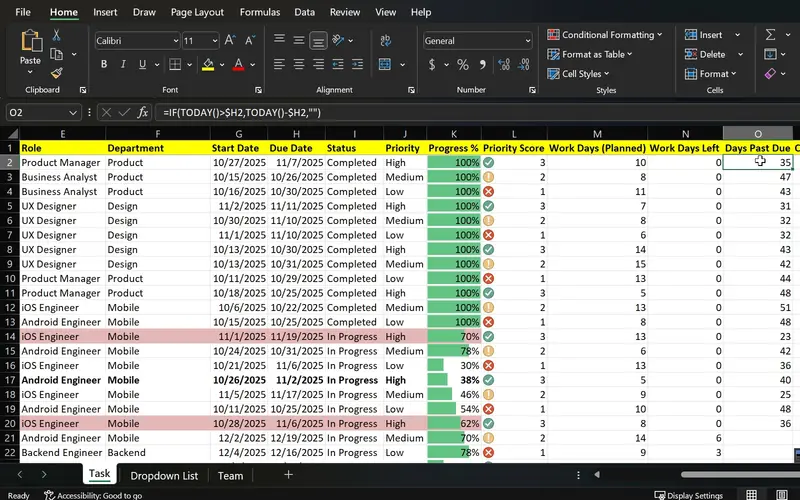
TaskFlow
One sheet that shows what is done, what is late and what is urgent.
Functions as a time-and-action calendar for tracking order milestones, displaying target dates, highlighted delays and a visual timeline leading up to ex-factory.
-
Project 06
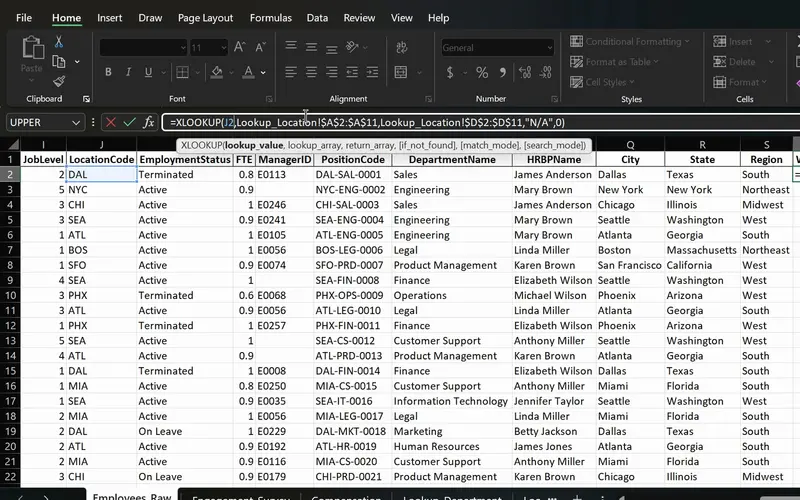
PeopleInsight HR workbook
Employee data joined across sheets with one formula.
Pull fabric consumption or trim costs from your costing list using style code lookups, just as this workbook retrieves employee details by ID.
-
Project 03
Sales Goal Tracker
Apply SUMIFS to calculate totals by buyer, colour and style, COUNTIFS to tally orders across stages, and combined IF and AND formulas to pinpoint delayed milestones.
Lessons
The lessons that matter, in course order.
The Complete Excel Course with AI Integration has 186 lessons. This page picks out 46 of them, 3 h 54 min of video. Each lesson keeps its number in the course.
Where to start
Lesson 6 Number formatting in Excel
Start with Lesson 6 if basic data entry is comfortable but formulas are unfamiliar, as garment costing relies on arithmetic and cell formatting. For complete beginners, start at Lesson 1. Those who already know how to use IF and SUMIFS can jump ahead to Lesson 67 to learn style code lookups, or proceed straight to Lesson 79 to construct TaskFlow.
46 of 186 lessons · 3 h 54 min
01 Microsoft Excel fundamentals: building a foundation from scratch Learn the calculation methods required for a costing sheet: setting clear number formats, adding and multiplying fabric, trims and making, locking rates in place with absolute cell references, working out margin percentages and troubleshooting common formula errors. The exercises use a personal budget, but a cost sheet relies on the same formulas.
- 6 Start here Number formatting in Excel Currency, date and percentage formats for a budget 5 min
- 7 Cell formatting in Excel AutoFit column width, the #### error and cell styles 6 min
- 8 Basic maths in Excel Add, subtract, multiply and divide with formulas 3 min
- 9 SUM and AutoSum in Excel Total income, expenses and savings with MAX 6 min
- 10 Relative vs absolute references in Excel Dollar signs and mixed references 3 min
- 11 Calculating percentages in Excel Each expense as a percentage of income 2 min
- 12 Common Excel errors and how to fix them DIV0, NAME, VALUE errors and IFERROR 4 min
04 Essential formulas and functions (IF, SUMIF and more) Use IF alongside AND to spot overdue milestones or fabric shortages, SUMIF and SUMIFS to aggregate order volumes across style, colour and buyer, COUNTIFS to monitor order counts by stage, and date calculations to count backwards from shipment dates. These examples are demonstrated using sales records.
- 28 Logical functions in Excel TRUE and FALSE comparisons for beginners 5 min
- 29 The IF function in Excel Pass or fail results with a single condition 3 min
- 30 IF function practice in Excel Categorise sales data with IF formulas 6 min
- 31 Nested IF and IFS in Excel Customer value tiers with nested IF 6 min
- 32 Nested IF and IFS in Excel Sales performance labels with the IFS function 5 min
- 33 AND and OR with IF in Excel Flag high-value deals with multiple conditions 8 min
- 34 SUM, COUNT and COUNTA in Excel SUM with FILTER and counting numbers with COUNT 7 min
- 35 SUM, COUNT and COUNTA in Excel COUNTA, unique counts and completeness checks 4 min
- 36 SUMIF and COUNTIF in Excel Conditional sum and count with one criterion 8 min
- 37 SUMIFS and COUNTIFS in Excel Sum and count with multiple criteria 7 min
- 38 The Excel function library Insert Function dialog and Formula AutoComplete 5 min
- 39 Date and time functions in Excel TODAY, NOW, MONTH and date arithmetic 6 min
- 40 Excel Ninja Challenge COUNTIF, SUMIF, IF, COUNTIFS, SUMIFS and IFS practice 8 min
05 Text functions and data validation (enhancing data quality) Maintain clean, uniform records: join style, colour and size codes using CONCAT and TEXTJOIN, standardise text casing and clean up labels with TRIM, UPPER and PROPER, search and replace text with FIND and SUBSTITUTE, divide codes using Text to Columns, and restrict entries for colour, size and status with drop-down menus.
- 41 CONCAT, the & operator and TEXTJOIN in Excel Combine text from multiple cells 6 min
- 42 TRIM, UPPER, LOWER and PROPER in Excel Clean messy text and fix capitalisation 6 min
- 43 FIND, SEARCH and SUBSTITUTE in Excel Locate and replace text with formulas 5 min
- 44 Text to Columns wizard in Excel Split a column by a comma delimiter 4 min
- 45 Data validation in Excel Create drop-down lists for consistent data entry 4 min
08 Advanced Excel functions: lookups, text and arrays Style-based lookups and array tools: pull trim costs and fabric consumption into order sheets using XLOOKUP, VLOOKUP and INDEX and MATCH, manage unmatched styles with IFERROR, extract code components using LEFT, RIGHT and MID, calculate net working days with NETWORKDAYS, and arrange orders by ship date for individual buyers using FILTER, SORT and SORTBY.
- 67 Lookup functions in Excel The PeopleInsight HR dataset and why lookups matter 2 min
- 68 VLOOKUP in Excel Find employee data across sheets with exact match 4 min
- 69 XLOOKUP in Excel Exact match, if not found and two-way lookup 6 min
- 70 IFERROR in Excel Handle lookup errors in VLOOKUP and XLOOKUP formulas 3 min
- 71 INDEX and MATCH in Excel A flexible alternative to VLOOKUP 6 min
- 72 CONCAT and TEXTJOIN in Excel Combine employee names and text with a delimiter 3 min
- 73 LEFT, RIGHT and MID in Excel Extract parts of a text code like DAL-SAL-0001 7 min
- 74 TODAY, EOMONTH and NETWORKDAYS in Excel Date calculations for HR data 5 min
- 75 UNIQUE function in Excel Extract a distinct list with dynamic arrays 6 min
- 76 FILTER function in Excel Dynamic array filtering with AND and OR criteria 5 min
- 77 SORT and SORTBY in Excel Sort data dynamically with formulas 4 min
- 78 Excel Ninja Challenge XLOOKUP, totals and text concatenation lookup challenge 3 min
09 Project: task automation with data validation and forms Build a time-and-action calendar via the TaskFlow project: configure drop-down lists for priority and status, highlight late milestones with conditional formatting, construct a Gantt-style timeline, calculate remaining days using NETWORKDAYS and TODAY, and lock cells to protect the sheet. Although designed for general tasks, milestones like fabric approval and ex-factory use the same column structure.
- 79 TaskFlow project tracker in Excel Overview of the task tracker dashboard 4 min
- 80 Designing a task tracker in Excel TaskFlow layout, columns and headers 5 min
- 81 Data validation in Excel Status and priority drop-down lists in TaskFlow 8 min
- 82 Conditional formatting in Excel Highlight overdue and completed tasks 8 min
- 83 Gantt chart in Excel Build a project timeline with conditional formatting 6 min
- 84 Data bars and icon sets in Excel Visual priority and progress in TaskFlow 6 min
- 85 NETWORKDAYS and TODAY in Excel Days remaining and task deadlines in TaskFlow 5 min
- 86 Protect a sheet and lock cells in Excel Secure the TaskFlow tracker workbook 4 min
- 87 Testing an Excel task tracker Stress test TaskFlow with sample data 3 min
Instructors
Who teaches it.

Instructor, Excel with AI
Virginia Thorn
Emmy Award winner. Teaches Excel with AI at Coding Liquids.
Questions
Asked before starting.
Which Excel course is suitable for an apparel merchandiser?
The Complete Excel Course with AI Integration from Coding Liquids covers the spreadsheets an apparel merchandiser relies on daily: garment costing calculations using percentages and absolute cell references, building a time-and-action calendar through the TaskFlow tracker, handling style codes with CONCAT and LEFT, fetching fabric and trim data with XLOOKUP, and producing separate order lists for each buyer with FILTER. The training uses non-apparel datasets, so you apply the techniques to your own factory styles. In total, this track comprises 46 lessons, taking 3 hours 54 minutes.
Can an apparel merchandiser learn to build a garment costing sheet from this course?
You can build the workbook itself, though not the costing methodology. The Complete Excel Course with AI Integration teaches the formulas that make up a cost sheet: multiplying consumption by unit rates, totalling trims and making charges, locking individual rate cells with absolute references, and adding profit margin as a percentage. Working out fabric consumption figures or setting manufacturing charges is not covered, so you must apply your own factory rules.
Can an apparel merchandiser create a time-and-action calendar in Excel with this course?
Yes. Through The Complete Excel Course with AI Integration, the TaskFlow tracker project guides you through setting up status drop-down menus, colour highlights for late milestones, a Gantt-style timeline and formulas for working days remaining. To adapt this into an order calendar, set out production milestones, use date subtraction to count backwards from the shipment date, and rely on conditional formatting to show any delays.
Does the course cover sourcing or production management for apparel merchandisers?
No. Because The Complete Excel Course with AI Integration focuses strictly on Excel, topics such as fabric sourcing, supplier negotiation, production management and garment costing practices are excluded. The lessons instead support the workbooks surrounding those tasks, including the garment cost sheet, the time-and-action calendar, material booking verifications and order status reports prepared for buyers.
Excel with AI
See the whole course.
The Complete Excel Course with AI Integration: 16 hours of video in 186 lessons, built around 14 projects, with lifetime access, a Certificate of Completion and a 14-day money-back guarantee.
The same course
For another job, level or topic.
By job
Finance and accounting
- Accountants and finance teams
- Bookkeepers and accounts assistants
- FP&A and budget analysts
- Auditors and fraud examiners
- Payroll administrators
- Tax accountants and advisers
- Banking professionals
- Cost and management accountants
- Financial controllers
- Credit control and receivables teams
- Accounts payable teams
- Financial planners and advisers
- Credit analysts and loan officers
- Insurance underwriters
- Insurance claims handlers
- Reconciliation analysts
- Treasury analysts
- Medical billing and coding specialists
- Fund accountants
- Billing administrators
- AML and KYC analysts
- Actuarial analysts
- Insurance agents and brokers
HR and office administration
Operations and supply chain
Data and reporting
Sales, marketing and customer service
Business and management
Engineering, construction and manufacturing
- Quantity surveyors and estimators
- Civil and site engineers
- Quality managers and engineers
- Construction project managers
- Health and safety officers
- Document controllers
- Production managers and supervisors
- Mechanical and electrical engineers
- Industrial engineers
- Planning engineers
- Sustainability and ESG analysts
- Maintenance planners