



The Complete Excel Course with AI Integration
Excel course for billing administrators
For billing administrators and invoicing staff who turn orders, timesheets and usage into invoices in Excel. This page picks out the parts of The Complete Excel Course with AI Integration that billing work uses: the arithmetic of a billing line, lookups for rates and customer terms, rules for tiers and minimum charges, text functions for descriptions, totals that agree with the ledger, and a VBA macro that checks the file before it is sent.
Taught by Sagnik Bhattacharya and Virginia Thorn

What you will be able to do
At work, you will be able to:
- Build invoice lines from orders, timesheets or usage with quantity times rate, discounts as percentages and totals that hold their references when copied.
- Bring each customer's rate and payment terms onto the billing file with XLOOKUP, and catch lines with no matching rate with IFERROR.
- Pick the right volume tier or minimum charge with IFS, and total charges by customer and month with SUMIFS to agree them with the ledger.
- Write clear line descriptions with CONCAT and TEXTJOIN, and keep service codes consistent with drop-down lists.
- List the work not yet billed for the period with FILTER and EOMONTH, ordered by customer with SORT.
- Run a VBA macro over the billing file before it goes out: IsNumeric catches an amount entered as text, empty cells are marked, and each problem is coloured.
Projects
What you will build.
The course has 14 projects. These four matter most here.
-
Project 06
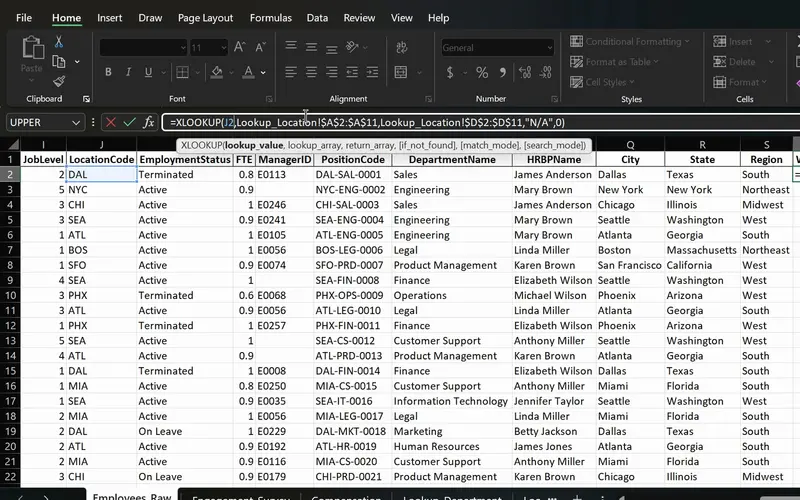
PeopleInsight HR workbook
Employee data joined across sheets with one formula.
Rates and terms brought onto each billing line by customer or service code, practised on HR records, with IFERROR naming any line whose code the rate card lacks.
-
Project 11
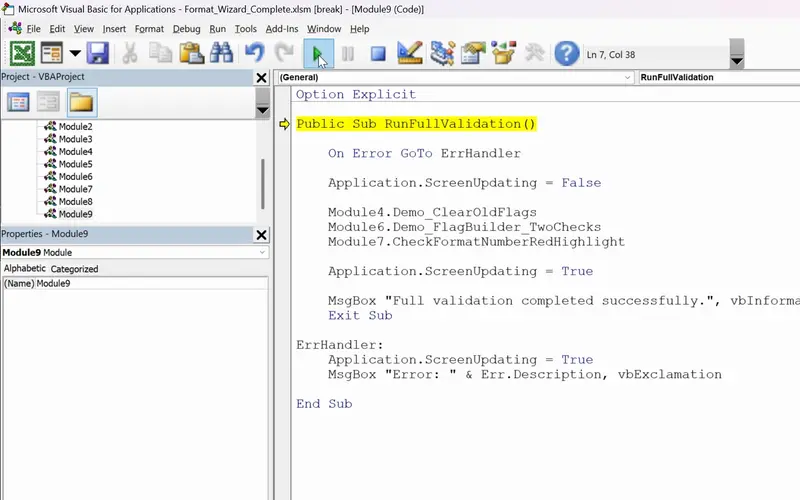
FormatWizard
One click that checks a whole sheet for you.
The check before a billing file goes out, on the pattern of the project's check of a sales sheet: VBA that walks each line, flags empty fields and amounts that are not numbers, colours them and stops cleanly on an error.
-
Project 03
Sales Goal Tracker
IFS and SUMIFS on sales targets; on a billing file the same functions pick a volume tier and total each customer's charges for the period.
-
Project 02
Dunder Michael Paper Company employee database
Text functions and drop-down lists practised on employee records: the tools that keep customer names, references and service codes the same on every billing line.
Lessons
The lessons that matter, in course order.
The Complete Excel Course with AI Integration has 186 lessons. This page picks out 53 of them, 4 h 18 min of video. Each lesson keeps its number in the course.
Where to start
Lesson 8 Basic maths in Excel
Begin at Lesson 8 if you can already enter data: a billing line is arithmetic first. If formulas with absolute references are routine, go to Lesson 28, where tiers and minimum charges start with IF. New to Excel? Begin at Lesson 1. If lookups and SUMIFS are daily tools, go to Lesson 136 for the checking macro.
53 of 186 lessons · 4 h 18 min
01 Microsoft Excel fundamentals: building a foundation from scratch The arithmetic of a billing line: quantity times rate, SUM and AutoSum for totals, absolute references that hold a rate or discount fixed as a formula is copied, and percentages for discounts and surcharges. The lessons use a personal budget.
- 8 Start here Basic maths in Excel Add, subtract, multiply and divide with formulas 3 min
- 9 SUM and AutoSum in Excel Total income, expenses and savings with MAX 6 min
- 10 Relative vs absolute references in Excel Dollar signs and mixed references 3 min
- 11 Calculating percentages in Excel Each expense as a percentage of income 2 min
04 Essential formulas and functions (IF, SUMIF and more) Billing rules as formulas: IF and IFS for volume tiers and minimum charges, AND and OR for lines that are both billable and approved, COUNT and COUNTA for missing fields, SUMIFS and COUNTIFS for charges by customer and month, and date arithmetic for billing periods and due dates.
- 28 Logical functions in Excel TRUE and FALSE comparisons for beginners 5 min
- 29 The IF function in Excel Pass or fail results with a single condition 3 min
- 30 IF function practice in Excel Categorise sales data with IF formulas 6 min
- 31 Nested IF and IFS in Excel Customer value tiers with nested IF 6 min
- 32 Nested IF and IFS in Excel Sales performance labels with the IFS function 5 min
- 33 AND and OR with IF in Excel Flag high-value deals with multiple conditions 8 min
- 34 SUM, COUNT and COUNTA in Excel SUM with FILTER and counting numbers with COUNT 7 min
- 35 SUM, COUNT and COUNTA in Excel COUNTA, unique counts and completeness checks 4 min
- 36 SUMIF and COUNTIF in Excel Conditional sum and count with one criterion 8 min
- 37 SUMIFS and COUNTIFS in Excel Sum and count with multiple criteria 7 min
- 38 The Excel function library Insert Function dialog and Formula AutoComplete 5 min
- 39 Date and time functions in Excel TODAY, NOW, MONTH and date arithmetic 6 min
- 40 Excel Ninja Challenge COUNTIF, SUMIF, IF, COUNTIFS, SUMIFS and IFS practice 8 min
05 Text functions and data validation (enhancing data quality) Text and data entry for billing files: CONCAT, the & operator and TEXTJOIN for line descriptions, TRIM and PROPER for customer names, FIND and SUBSTITUTE for references, Text to Columns, drop-down lists for service codes, and a Ninja Challenge on a messy list.
- 41 CONCAT, the & operator and TEXTJOIN in Excel Combine text from multiple cells 6 min
- 42 TRIM, UPPER, LOWER and PROPER in Excel Clean messy text and fix capitalisation 6 min
- 43 FIND, SEARCH and SUBSTITUTE in Excel Locate and replace text with formulas 5 min
- 44 Text to Columns wizard in Excel Split a column by a comma delimiter 4 min
- 45 Data validation in Excel Create drop-down lists for consistent data entry 4 min
- 46 Ninja Challenge: problem Clean messy data with text functions and validation 4 min
- 47 Ninja Challenge: solution PROPER, Text to Columns and drop-down lists 7 min
08 Advanced Excel functions: lookups, text and arrays XLOOKUP, VLOOKUP and INDEX and MATCH for rates and customer terms, the two-way lookup for a rate by service and tier, IFERROR for a code with no rate, LEFT, RIGHT and MID for parts of account codes, EOMONTH for period ends, and UNIQUE, FILTER and SORT for the customers to bill and the work not yet billed.
- 67 Lookup functions in Excel The PeopleInsight HR dataset and why lookups matter 2 min
- 68 VLOOKUP in Excel Find employee data across sheets with exact match 4 min
- 69 XLOOKUP in Excel Exact match, if not found and two-way lookup 6 min
- 70 IFERROR in Excel Handle lookup errors in VLOOKUP and XLOOKUP formulas 3 min
- 71 INDEX and MATCH in Excel A flexible alternative to VLOOKUP 6 min
- 72 CONCAT and TEXTJOIN in Excel Combine employee names and text with a delimiter 3 min
- 73 LEFT, RIGHT and MID in Excel Extract parts of a text code like DAL-SAL-0001 7 min
- 74 TODAY, EOMONTH and NETWORKDAYS in Excel Date calculations for HR data 5 min
- 75 UNIQUE function in Excel Extract a distinct list with dynamic arrays 6 min
- 76 FILTER function in Excel Dynamic array filtering with AND and OR criteria 5 min
- 77 SORT and SORTBY in Excel Sort data dynamically with formulas 4 min
- 78 Excel Ninja Challenge XLOOKUP, totals and text concatenation lookup challenge 3 min
14 VBA and macros in Excel: FormatWizard FormatWizard: recorded macros and a button, then VBA with variables, If statements and loops that walk the billing file, flag empty cells, test amounts with IsNumeric, colour each problem and handle errors in one subroutine. The lessons check a sales sheet.
- 136 Excel macros and VBA for beginners What macros are, the FormatWizard project 3 min
- 137 Record your first Excel macro Name, run and use absolute references 6 min
- 138 Relative references in Excel macros Make recorded macros dynamic 4 min
- 139 Developer Tab in Excel Run macros from a button and the quick access toolbar 4 min
- 140 Save macros in Excel Macro-enabled workbooks and the XLSM file format 3 min
- 141 The VBA Editor in Excel Open it with Alt+F11 and learn the workspace 4 min
- 142 Working in the VBA editor Macro security, trust settings, switching to Excel 6 min
- 143 Your first VBA code Modules, worksheets, rows, columns and formatting 4 min
- 144 VBA variables and data types Sub vs function for Excel beginners 6 min
- 145 VBA functions in Excel Build GetLastUsedRow with find and exit function 5 min
- 146 Clear old flags with VBA Reset messages and fill colours with if statements 5 min
- 147 For Next loop in VBA Flag missing region values in Excel 4 min
- 148 VBA If Else and loops Check missing sales data and build a FlagText message 5 min
- 149 Highlight cells with VBA Interior.Color and RGB for missing data 5 min
- 150 IsNumeric in VBA Validate unit price and amount data types in Excel 7 min
- 151 Debugging VBA for beginners Debug.Print and the Immediate window 5 min
- 152 Complete Excel validation macro One VBA subroutine with an error handler 3 min
Instructors
Who teaches it.

Instructor, Excel with AI
Virginia Thorn
Emmy Award winner. Teaches Excel with AI at Coding Liquids.
Questions
Asked before starting.
Is there an Excel course for billing administrators?
Yes. The Complete Excel Course with AI Integration from Coding Liquids teaches the Excel behind a billing run: invoice lines worked out from quantity and rate, rates and customer terms looked up with XLOOKUP, tiers and minimum charges with IFS, totals by customer and month with SUMIFS, unbilled work listed with FILTER, and a VBA macro that checks the file before it is sent. The 53 lessons here come to 4 hours 18 minutes of the course's 16 hours.
Does it teach billing software or revenue recognition?
No. The Complete Excel Course with AI Integration teaches Excel only: billing and accounting systems, revenue recognition rules and accounting entries are not covered, and no lesson produces an invoice. It covers the spreadsheet steps around one: building the lines, looking up rates and terms, checking totals against the ledger with SUMIFS, and validating the file with VBA.
Can Excel check a billing file against the agreed contract rates?
Yes, with lookups The Complete Excel Course with AI Integration teaches. Keep the agreed rates in a table, bring the right one onto each line with XLOOKUP by customer and service code, and compare it with the rate billed: IF marks any line where the two differ, and IFERROR shows a code with no agreed rate. A FILTER list then gathers the lines to fix in one place.
How do I track work that has not been billed yet?
With a status column and FILTER, both taught in The Complete Excel Course with AI Integration: a drop-down list keeps each line's status to set words such as billed and unbilled, FILTER returns the unbilled lines up to the period end found with EOMONTH, and SUMIFS totals them by customer. The lessons apply FILTER to HR data.
Can a macro validate the billing file before it goes out?
Yes. FormatWizard in The Complete Excel Course with AI Integration builds one in steps: a recorded macro run from a button, then VBA that loops through every row, flags empty fields, checks with IsNumeric that amounts are numbers, colours each problem and stops cleanly through an error handler. The lessons check a sales sheet; the rules for your own billing file are yours to add.
Excel with AI
See the whole course.
The Complete Excel Course with AI Integration: 16 hours of video in 186 lessons, built around 14 projects, with lifetime access, a Certificate of Completion and a 14-day money-back guarantee.
The same course
For another job, level or topic.
By job
Finance and accounting
- Accountants and finance teams
- Bookkeepers and accounts assistants
- FP&A and budget analysts
- Auditors and fraud examiners
- Payroll administrators
- Tax accountants and advisers
- Banking professionals
- Cost and management accountants
- Financial controllers
- Credit control and receivables teams
- Accounts payable teams
- Financial planners and advisers
- Credit analysts and loan officers
- Insurance underwriters
- Insurance claims handlers
- Reconciliation analysts
- Treasury analysts
- Medical billing and coding specialists
- Fund accountants
- AML and KYC analysts
- Actuarial analysts
- Insurance agents and brokers
HR and office administration
Operations and supply chain
- Operations and project managers
- Procurement and purchasing officers
- Logistics coordinators
- Inventory controllers and storekeepers
- Supply chain analysts
- Warehouse managers and supervisors
- PMO analysts
- Import and export coordinators
- Production planners
- Demand planners
- Fleet and transport managers
- Apparel merchandisers
Data and reporting
Sales, marketing and customer service
Business and management
Engineering, construction and manufacturing
- Quantity surveyors and estimators
- Civil and site engineers
- Quality managers and engineers
- Construction project managers
- Health and safety officers
- Document controllers
- Production managers and supervisors
- Mechanical and electrical engineers
- Industrial engineers
- Planning engineers
- Sustainability and ESG analysts
- Maintenance planners