
The Complete Excel Course with AI Integration
Excel VBA, macros and Power Automate course
For people who do the same Excel task every week and want it done for them. The Complete Excel Course with AI Integration teaches automation from both sides: macros and VBA, which work inside a workbook, and Power Automate Desktop, which drives Excel from outside. This page lists both sections in full. No programming experience is assumed.
Taught by Sagnik Bhattacharya and Virginia Thorn


What you will be able to do
At work, you will be able to:
- Record a macro, make it work on any row with relative references, run it from a button and save it in a macro-enabled workbook.
- Read and write VBA: modules, variables and data types, Sub and Function, If and Else, and For Next loops.
- Write a validation macro that flags missing values, checks that a cell holds a number with IsNumeric, and highlights problems in colour.
- Find mistakes with Debug.Print and the Immediate window, and add an error handler.
- Build Power Automate Desktop flows that open Excel, read a worksheet, loop through its rows and write results back.
- Add conditions and approval steps to a flow, and start it from a desktop shortcut or a link.
Projects
What you will build.
The course has 14 projects. These two matter most here.
-
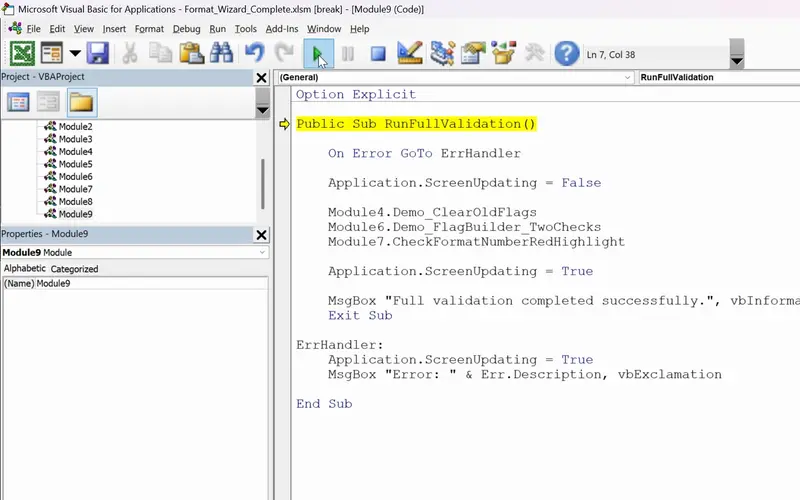
Project 11
FormatWizard
One click that checks a whole sheet for you.
A macro you write yourself that checks a whole sheet and reports when it has finished.
-
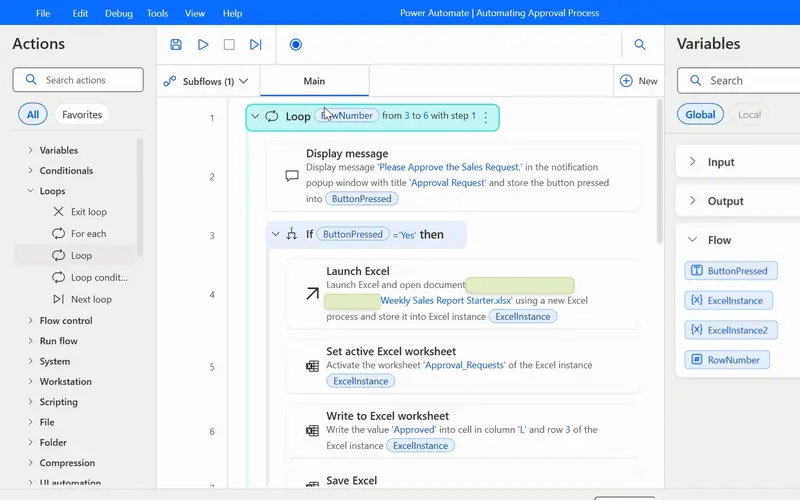
Project 13
AutoFlow
The weekly report routine, run by a flow instead of by you.
A flow that opens the workbook, loops through the rows, asks for approval and writes the answer into the sheet.
Lessons
The lessons that matter, in course order.
The Complete Excel Course with AI Integration has 186 lessons. This page picks out 29 of them, 2 h 9 min of video. Each lesson keeps its number in the course.
Where to start
Lesson 136 Excel macros and VBA for beginners
Begin at Lesson 136. You need to be comfortable entering data and writing simple formulas first; if you are not, begin at Lesson 1. If you only want Power Automate, go to Lesson 174: that section starts from setting up Power Automate Desktop.
29 of 186 lessons · 2 h 9 min
14 VBA and macros in Excel: FormatWizard FormatWizard: what macros are, recording one, relative references, the Developer tab and buttons, macro-enabled files, the VBA editor and macro security, your first code, variables and functions, If statements and loops, highlighting cells, IsNumeric, debugging, and the finished validation macro with an error handler.
- 136 Start here Excel macros and VBA for beginners What macros are, the FormatWizard project 3 min
- 137 Record your first Excel macro Name, run and use absolute references 6 min
- 138 Relative references in Excel macros Make recorded macros dynamic 4 min
- 139 Developer Tab in Excel Run macros from a button and the quick access toolbar 4 min
- 140 Save macros in Excel Macro-enabled workbooks and the XLSM file format 3 min
- 141 The VBA Editor in Excel Open it with Alt+F11 and learn the workspace 4 min
- 142 Working in the VBA editor Macro security, trust settings, switching to Excel 6 min
- 143 Your first VBA code Modules, worksheets, rows, columns and formatting 4 min
- 144 VBA variables and data types Sub vs function for Excel beginners 6 min
- 145 VBA functions in Excel Build GetLastUsedRow with find and exit function 5 min
- 146 Clear old flags with VBA Reset messages and fill colours with if statements 5 min
- 147 For Next loop in VBA Flag missing region values in Excel 4 min
- 148 VBA If Else and loops Check missing sales data and build a FlagText message 5 min
- 149 Highlight cells with VBA Interior.Color and RGB for missing data 5 min
- 150 IsNumeric in VBA Validate unit price and amount data types in Excel 7 min
- 151 Debugging VBA for beginners Debug.Print and the Immediate window 5 min
- 152 Complete Excel validation macro One VBA subroutine with an error handler 3 min
16 Power Automate: weekly sales report automation AutoFlow: setting up Power Automate Desktop, your first flow, connecting it to Excel, reading worksheet data, templates, running a flow from a shortcut or a link, the recorder, action properties, an approval flow with conditions, loops, and a Ninja Challenge.
- 174 Power Automate Desktop for Excel Set up AutoFlow and your first automation 3 min
- 175 Your first Power Automate flow Flows, triggers, actions and Display message 3 min
- 176 Connect Excel to Power Automate Launch Excel and the Excel instance variable 3 min
- 177 Copilot Vision with Power Automate AI-guided help while you build a flow 2 min
- 178 Read data from Excel with Power Automate Read from worksheet and close Excel 4 min
- 179 Power Automate templates Search and replace Excel values template walkthrough 7 min
- 180 Run Power Automate flows From a desktop shortcut and a run URL 3 min
- 181 Power Automate Desktop recorder Record desktop and browser actions into a flow 4 min
- 182 Action properties in Power Automate UI elements, variables and wait settings 4 min
- 183 Approval flow in Power Automate Desktop If conditions and message box buttons 9 min
- 184 Loops in Power Automate Desktop Loop and For each actions for Excel rows 5 min
- 185 Power Automate Ninja Challenge Flag onboarded rows with loop, read, if, write 5 min
Questions
Asked before starting.
Can a beginner learn Excel VBA with this course?
Yes. The macros and VBA section of The Complete Excel Course with AI Integration starts by recording a macro and explains the VBA editor, variables, If statements and loops for beginners, ending with a complete validation macro. You need the basics of Excel first, which the course also teaches.
Should I learn VBA or Power Automate?
The Complete Excel Course with AI Integration teaches both, because they do different jobs. A macro or VBA code works inside a workbook: FormatWizard checks a sheet in one click. Power Automate Desktop works from outside: AutoFlow opens Excel, reads rows, asks for approval and writes back. This page lists both sections: 29 lessons, 2 hours 9 minutes.
Does it cover Office Scripts or cloud flows?
No. The Complete Excel Course with AI Integration teaches VBA and Power Automate Desktop. It has no lessons on Office Scripts or on Power Automate flows that run in the cloud.
Do macros and Power Automate work on a Mac?
Power Automate Desktop does not: the requirements of The Complete Excel Course with AI Integration name its section as one that needs Windows. The macros and VBA section is not on that list.
Excel with AI
See the whole course.
The Complete Excel Course with AI Integration: 16 hours of video in 186 lessons, built around 14 projects, with lifetime access, a Certificate of Completion and a 14-day money-back guarantee.
The same course